Convert Your Angular Web App Into a Real Android & iOS App — No Migration Required
You spent months building a mature Angular application. Lazy-loaded modules, RxJS streams wired up just right, OnPush change detection squeezing every millisecond of performance out of the browser. The desktop experience is genuinely excellent.
Then a colleague pulls it up on their phone and looks at you like you personally insulted them.
Sound familiar? You're not alone — and the fix is a lot less painful than you're probably expecting.
You Built a Powerful Angular App. Your Mobile Users Are Suffering for It.
The Gap Between a Great Angular Web App and a Usable Mobile Experience
Here's the cruel irony of enterprise Angular development: all that architectural elegance that makes your app sing on a wide desktop viewport actively works against the people trying to use it on a 390px phone screen.
Think about what a field rep actually experiences when they try to open your data-heavy dashboard component on a 4G connection during a client meeting. There's no splash screen — just a blank white page while Angular bootstraps. No home screen icon — they bookmarked a URL three months ago and half the time can't find it. No pull-to-refresh — they're hunting for a reload button that doesn't exist on mobile. And the browser chrome eats a significant chunk of the already-tiny viewport.
The specific friction points enterprise mobile users hit, over and over:
- No swipe-to-go-back gesture — the browser back button isn't where their thumb expects it
- Data-dense views built for 1440px wide monitors squeezed onto a 390px screen, usually without the responsive breakpoints to handle it gracefully
- No home screen icon — a bookmarked URL is not an app, no matter how much you pretend it is
- Session drops when the browser tab gets killed in the background, because iOS is aggressive about memory and your Angular app isn't cheap to keep alive in a tab
[SYSTEM MEMORY ALLOCATION: BROWSER VS NATIVE WEBVIEW]

Browser Environment (Shared Tab Pool)
Tab 1 (News)    : [██████░░░░]
Tab 2 (Social)  : [████████░░]
Tab 3 (Angular) : [███.......] -> WARNING: Suspending to save RAM!

Native App Environment (AppOfWeb Container)
App (Angular)   : [██████████] -> 100% Dedicated Heap Allocation. Stable.
The good news: there's a faster path out of this than a full React Native or Flutter rewrite of your entire codebase.
Why Angular's Mobile Web Experience Falls Short (And It's Not Your Fault)
Angular Was Designed to Build Desktop-Grade Web Applications
Angular is an opinionated, enterprise-first framework. That's not a criticism — it's why large organizations trust it. The module system, TypeScript-first design, dependency injection container, and component lifecycle architecture are all built around the assumption that you're shipping a serious, complex single-page application to people sitting at desks.
That design philosophy creates friction on mobile in a few specific ways:
- Bundle weight: Even with code splitting across multiple lazy-loaded modules and tree shaking, a mature Angular enterprise app has a heavier initial payload than a mobile user on a spotty LTE connection really wants to deal with
- Interaction models: Click events, hover states, multi-step form inputs — all designed with a mouse and keyboard in mind, not a thumb
- No native gesture layer: Swipe-to-navigate, pinch-to-zoom on complex data tables, pull-to-refresh — none of these are built into Angular's component model because they're not browser primitives; they're native mobile UX patterns
- Memory competition: In a browser tab, your Angular app competes for memory with every other tab the user has open — and on mobile, that's a fight your app frequently loses
None of this is a reflection of how well your Angular app is built. It's just what happens when a framework designed for the desktop web gets accessed through a mobile browser.
What "Terrible Mobile Browsing Experience" Actually Looks Like in Practice
Picture the scenario concretely: a field sales rep is in front of a prospect, needs to pull up a live dashboard to show current pipeline numbers, and opens your Angular app in Chrome on their phone.
They get a white screen for three seconds while the Angular app bootstraps. Then a viewport that's technically functional but was clearly designed for someone with a much larger screen. No branded experience — just the generic browser chrome and a URL in the address bar. If their connection hiccups, they get an empty broken WebView, not a useful offline message.
This is a presentation-layer problem, not a code quality problem. Your Angular app's logic, data handling, and RxJS streams are all working exactly as designed. The problem is that the container around the app — the browser — is the wrong container for mobile.
Bookmarking a URL Is Not an App
Your enterprise users — and their IT departments — expect App Store downloads. That's the mental model they have for "apps that work on phones." A bookmarked URL is, at best, a workaround.
You might be thinking about Progressive Web Apps (PWAs) here, and they're worth addressing directly. PWAs are a genuine improvement over a raw bookmarked URL, and if you've already implemented one for your Angular application, that's a reasonable step. But PWAs still have real limitations for enterprise use cases:
- Push notification reliability on iOS has historically been poor and heavily restricted by Apple's platform rules
- App Store discoverability is zero — PWAs cannot be found, downloaded, or managed through Apple or Google's distribution channels
- MDM distribution is a problem — IT departments that manage devices through Mobile Device Management systems can't manage a PWA install the way they can manage a proper native app package
- It still feels like a browser, because it fundamentally is one — and enterprise users notice
There's a better solution that solves all three gaps without touching your Angular codebase.
Why a Native-Feeling App Beats a Mobile Website for Angular Users
Your Angular App Already Has the Performance — It Just Needs the Shell
Here's something worth internalizing: your Angular app's performance is not the bottleneck. AOT compilation, OnPush change detection, zone.js optimization — the runtime performance of a well-built Angular application is genuinely good. The issue isn't what's happening inside your Angular app; it's the container around it.
What's missing is the native shell: an App Store presence, gesture support, push notification infrastructure, a branded launch experience, and an icon on the home screen. Those are all presentation-layer additions, not architectural ones.
This is why wrapping beats rewriting for most mature Angular enterprise applications:
| Approach | Time | Risk | Angular Codebase |
|---|---|---|---|
| Full React Native / Flutter rewrite | Months of engineering | High — you're rebuilding every module from scratch | Abandoned |
| Full Flutter / Capacitor migration | Weeks to months | Medium — still touching your source | Modified |
| WebView wrapper (AppOfWeb) | Days | Very low — zero changes to your Angular app | Untouched |
Rewrite Estimated Cost
$24,000AppOfWeb Cost
Fraction of CostWhat Enterprise Mobile App Users Actually Expect
The bar for "this feels like a real app" isn't actually that high. Enterprise users want:
- One-tap launch from the home screen, not a browser shortcut
- Push notifications for alerts, approvals, and workflow triggers
- Branded splash screen and app icon — not a generic browser tab with a favicon
- Pull-to-refresh instead of hunting for a reload button
- Offline state handling that looks intentional, not broken
- App Store presence for IT department managed distribution via MDM
Every single one of these is a native shell feature, not an Angular code change.
SEO Is Safe — Your Angular App's Search Ranking Stays Intact
This one comes up in almost every conversation with Angular teams: if we wrap the app in a mobile container, what happens to our search ranking?
Nothing. Your Angular web app URL doesn't change. It continues to be indexed exactly as it is today. The mobile app is a separate engagement channel — it loads your existing Angular app inside a dedicated native container. The web presence and the mobile app run in parallel without interfering with each other.
How AppOfWeb Converts Your Angular Web App Into a Mobile App
The Simple Premise — Your Angular URL Is All You Need
AppOfWeb wraps your existing Angular web application inside a fully managed, production-ready Android and iOS shell. The process doesn't require:
- Any changes to your Angular source code
- A TypeScript migration of any kind
- New modules, updated component trees, or refactored RxJS streams
- Access to your GitHub repository or build pipeline
You submit your live Angular app URL. AppOfWeb delivers a complete mobile app. That's the whole premise.
"Will a WebView Handle Our Angular App?" — Let's Address That Directly
This is the number-one concern from Angular development teams, and it's exactly the right question to ask.
The direct answer: yes, modern WebViews handle complex Angular SPAs very well — and in some respects, better than a mobile browser tab.
Here's why. Android's WebView is powered by Chromium — the same rendering engine as Chrome. iOS's WKWebView is the same engine that powers Safari. These are not the primitive embedded browsers from 2012. They are fully capable of rendering complex Angular applications, running TypeScript-compiled bundle output, handling RouterModule navigation, and managing RxJS subscriptions.
Now here's the part most people don't expect: Angular's AOT compilation actually performs well inside a dedicated WebView. Your Angular app's compiled JavaScript output is optimized for fast parsing and execution. In a dedicated WebView — unlike a browser tab — it doesn't compete for memory with the user's other open tabs. For memory-intensive Angular applications with complex component trees, this can actually result in more stable performance than running in a mobile browser.
AppOfWeb is engineered specifically for enterprise-grade, data-heavy web applications. Heavy component trees and complex RxJS data flows are the expected use case, not the edge case. If you've built a genuinely complex Angular enterprise app, this wrapper was designed for apps like yours.
Fully Managed — No DevOps, No Xcode, No Android Studio
If your team has never shipped a mobile app before, this is the part that will matter most to you.
Building for Android and iOS natively involves Apple Developer account management, code signing certificates, provisioning profiles, Google Play signing key configuration, and maintaining a separate CI/CD pipeline for mobile builds — on top of the pipeline you're already running for your Angular app.
AppOfWeb handles all of it. You provide a URL. They deliver a mobile app. No Xcode. No Android Studio. No App Store review compliance research. No screenshot specifications. All of that operational overhead stays off your team's plate.
AppOfWeb Features — Built for Enterprise Angular Applications
Core App Experience Features
App Icon & Splash Screen
Replace the generic browser tab experience with a branded home screen icon and a professional launch screen. For enterprise Angular apps distributed to internal teams, this matters more than it might seem — a branded icon signals that this is a managed, professional tool, not a web shortcut someone emailed around.
Customizable Bottom Tabs
Map your Angular app's main navigation routes to persistent bottom tabs that appear at the bottom of the screen. If your Angular router is already configured with primary routes for your main sections, those routes map directly onto the tab structure. Enterprise users get the familiar native app navigation pattern they expect; your Angular routing logic stays exactly as it is.
Pull To Refresh
Adds the swipe-down gesture that every mobile user reaches for instinctively. This is especially important for Angular apps displaying live data — dashboards, feed-style views, or any component that reflects real-time state. Users shouldn't have to hunt for a reload mechanism.
Pinch To Zoom
Allows users to zoom into data-dense views — tables, charts, complex form layouts — that were built for desktop viewports. This is a pragmatic feature for enterprise Angular apps: it reduces frustration on complex UI without requiring a full responsive redesign of your component library.
Page Loader
Displays a branded loading indicator while Angular bootstraps or lazy-loads a module. If you've got a significant initial bundle (and most mature Angular enterprise apps do), this prevents the blank white flash that makes SPAs feel broken on slower mobile connections. It tells users the app is loading — it's not frozen.
No Internet Screen
Shows a custom, branded offline message instead of a broken WebView state when connectivity drops. For field teams on inconsistent mobile connections, this transforms an anxiety-inducing crash into a comprehensible, managed experience.
Status Bar Customization
Match the device status bar color to your Angular app's design system or brand color palette. It's a small detail, but it meaningfully shifts user perception from "this is a website in an app frame" to "this is a real app."
Distribution & Engagement Features
Share App
Built-in app sharing functionality for distributing the app link across an enterprise organization — useful for rolling out to field teams, onboarding new employees, or expanding access to regional offices without going through IT for every individual install.
Rate App
Prompts users to leave an App Store review at an appropriate moment in the user journey. Relevant if your Angular app is being made available for public download, where App Store visibility and review count affect discoverability.
Customize Package Name
Set a custom Android package name and iOS bundle identifier — for example, com.yourcompany.appname. This is essential for enterprise Angular teams planning to distribute through MDM solutions. IT departments that whitelist apps by bundle identifier, or that push apps to managed devices, need a deterministic, organization-controlled package name. This feature exists specifically for that requirement.
App Syncing With Web App
Because the mobile app loads your live Angular web app URL, any deployment to your Angular application is immediately reflected in the mobile app. Push a bug fix, deploy a new component, update a route — users see it the next time they open the app. No App Store resubmission required for content or feature updates.
This is one of the most operationally valuable aspects of the wrapper model: your existing Angular deployment workflow is your mobile deployment workflow. Nothing changes.
Unlimited Revisions
Request changes to app configuration — tab labels, icons, colors, package names — without a cap on revisions. Enterprise Angular projects evolve. Branding guidelines change. New navigation requirements emerge. The app configuration doesn't get locked in at launch.
Add-On Features
Push Notifications
Send targeted push notifications to mobile app users — alerts for new dashboard data, workflow approval requests, system updates, scheduled maintenance windows. For enterprise Angular teams, push notifications are often the single feature that makes the difference between a tool people check reactively and one that actively drives workflow adoption.
Publishing to Stores
AppOfWeb manages the full App Store and Google Play submission process: review compliance, screenshots, app descriptions, version management, and the back-and-forth with Apple's review team if it comes to that. For developer teams that have never shipped a mobile app, this removes the single biggest operational bottleneck in the entire process.
From Angular Web App URL to Live Mobile App — Step by Step
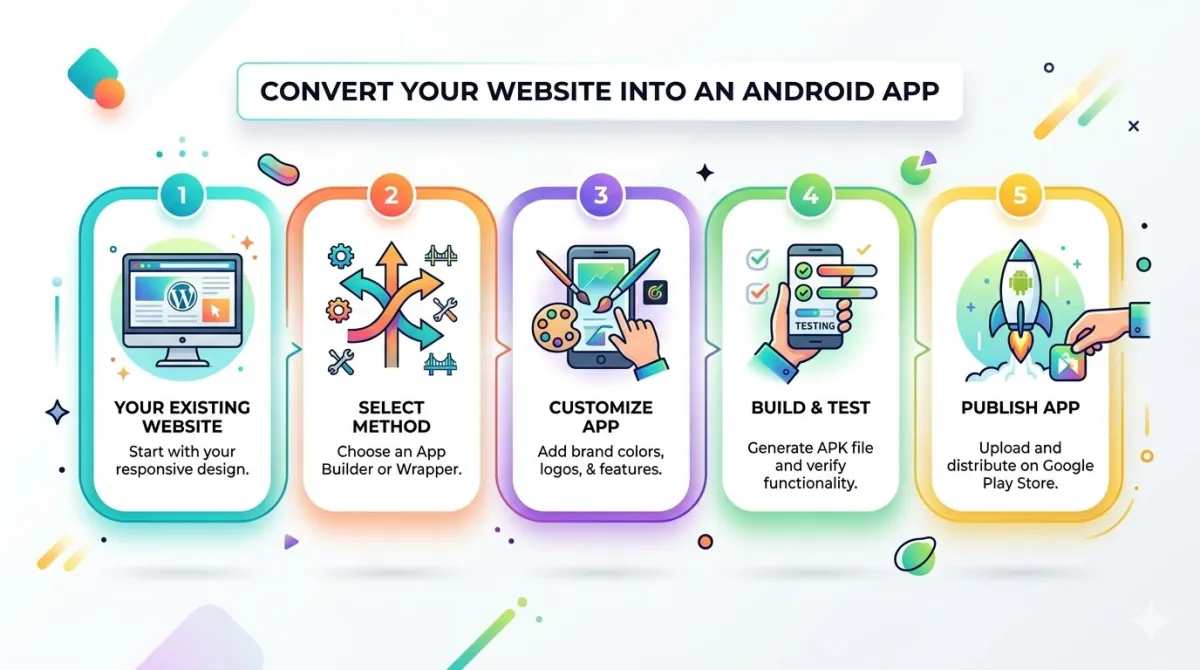
Getting from your existing Angular application to a live mobile app is a linear process. Here's what it actually looks like:
Step 1 — Submit Your Angular Web App URL
Visit appofweb.com and enter the URL of your live Angular application. The app needs to be publicly accessible — or accessible within your intended deployment environment. Your TypeScript source, component architecture, and repository never enter the picture.
Step 2 — Configure Your App Settings
Provide your branding assets: app icon, splash screen image, and primary brand color. Define your bottom tab structure, aligning tabs to the main navigation routes already configured in your Angular RouterModule. Set your Android package name and iOS bundle identifier for MDM compatibility.
Step 3 — AppOfWeb Builds Your App
The AppOfWeb team wraps your Angular application in a native Android and iOS shell. Your Angular codebase — modules, components, services, RxJS streams — stays entirely on your server, entirely untouched. The build process is fully managed, and your Angular engineering team doesn't need to be involved at this stage.
Step 4 — Review and Revise
Receive a working build for testing on real Android and iOS devices. Test it against your Angular app's actual routes, including lazy-loaded modules and guard-protected routes. Request revisions — icon adjustments, tab tweaks, color corrections — at no additional cost, with no limit on revision rounds.
Step 5 — Publish or Distribute
Option A: Use the Publishing Add-On and AppOfWeb handles App Store and Google Play submission on your behalf.
Option B: Receive the build files (APK for Android, IPA for iOS) and distribute internally via your organization's MDM solution, bypassing the public App Store entirely.
Real Questions From Angular Teams — Answered Honestly
"Our Angular App Is Heavy. Will the WebView Crash or Lag?"
This deserves a direct, technical answer rather than hand-waving.
Android's WebView is Chromium-based. iOS uses WKWebView — the same engine that powers Safari. These are the same rendering engines your Angular app runs on in a desktop browser, and they're fully capable of handling Angular's AOT-compiled JavaScript output.
The key difference from a mobile browser tab: a dedicated WebView doesn't compete for memory with other browser tabs. In a mobile browser, your Angular app is one of potentially dozens of tabs that the OS is trying to keep alive simultaneously — and iOS aggressively suspends tabs it hasn't seen recently. In a dedicated WebView, your Angular app gets the full memory allocation. For memory-intensive Angular applications with complex component trees, this is frequently an improvement over running in a mobile browser.
AppOfWeb is built for enterprise-grade web apps — not lightweight marketing sites. Heavy component hierarchies and complex RxJS data flows are the expected input, not the unusual edge case.
"We Already Have a PWA. Why Do We Need This?"
PWAs are a legitimate step and worth keeping in place. But they have concrete limitations for enterprise Angular teams that a WebView wrapper solves:
- Push notifications on iOS have been historically unreliable and tightly controlled by Apple's restrictions — native app push notifications work consistently; PWA push notifications on iOS have a complicated history
- App Store discoverability is zero — PWAs cannot be found, installed, or managed through Apple or Google's distribution channels
- MDM management isn't possible with PWA installs the way it is with native app packages with deterministic bundle identifiers
A WebView wrapper with a proper App Store listing solves all three gaps with zero changes to your Angular codebase.
"What Happens When We Deploy Updates to the Angular App?"
Nothing special happens on the mobile side — and that's the point. Because the mobile app loads your live Angular web app URL, any deployment to your Angular application is immediately live in the mobile app. Update a component, push a new lazy-loaded module, fix a bug — users see it the next time they open the app.
Only changes to the native shell itself — the icon, splash screen, bottom tabs, or package name — require a new app build. Everything inside your Angular codebase is just the web app, deployed and updated exactly as you do today.
"Can Our IT Department Distribute This Through MDM?"
Yes. The custom package name feature exists specifically for this requirement. AppOfWeb can deliver raw APK (Android) or IPA (iOS) build files for sideloading and MDM distribution, bypassing the public App Store entirely if that's what your organization's deployment model requires.
Frequently Asked Questions
Does AppOfWeb support Angular apps that use lazy-loaded modules?
Yes. Because your Angular app runs entirely on your server and is loaded into the WebView via URL, all routing behavior — including lazy-loaded modules configured in your RouterModule — works exactly as it does in a desktop browser. AppOfWeb doesn't modify or re-bundle your Angular application in any way.
Will Angular's router work correctly inside the WebView?
Yes. The WebView renders your Angular app's full routing behavior, including RouterModule configuration, route guards, and nested routing. Deep-link support for specific Angular routes can also be configured within the native app shell.
Our Angular app uses HTTP interceptors for auth. Will sessions persist inside the app?
Session handling, cookies, and HTTP interceptors all function within the WebView exactly as they do in a browser environment. Auth flows that depend on redirects or OAuth callbacks can be accommodated with proper configuration during the setup process.
Can we use this if our Angular app is hosted behind a VPN or on an internal network?
AppOfWeb requires your Angular app to be reachable by the WebView at runtime. For internal network deployments, the recommended approach is distributing the app via MDM with VPN configuration handled at the device level — so the device is already inside your network when the app launches.
Will the app need to be resubmitted to the App Store every time we update our Angular app?
No. Content updates, new features, bug fixes, and data changes to your Angular web app are reflected in the mobile app the next time users open it — no App Store resubmission required. Resubmission is only triggered when the native shell configuration itself changes (icon, tabs, package name, splash screen).
How long does it take to go from submitting our Angular app URL to receiving a working build?
Timelines vary based on configuration complexity, but AppOfWeb consistently delivers initial builds faster than any in-house mobile development cycle — and without pulling a single Angular engineer away from the web codebase. There's no Xcode setup, no Android Studio configuration, no signing certificate management on your end.
Do we need to give AppOfWeb access to our Angular source code or GitHub repository?
No. AppOfWeb only needs the public-facing URL of your deployed Angular application. Your TypeScript source code, component architecture, RxJS logic, dependency injection configuration, and repository remain entirely private and untouched throughout the entire process.
Your Angular App Is Already Built. Now Make It Mobile.
Here's what all of this comes down to:
Angular's enterprise-grade architecture is a performance asset, not a liability. The WebView handles it. The gap isn't in your Angular code — it's in the native container around it.
A WebView wrapper isn't a compromise for mature Angular codebases. It's the rational choice compared to a full cross-platform rewrite that would cost months of engineering time, introduce regression risk across every module and service, and ultimately produce a parallel codebase that diverges from your Angular web app every time either one ships a feature.
AppOfWeb handles every layer of the native shell — App Store submission, native UX features like pull-to-refresh and gesture navigation, push notifications, MDM-compatible package names — so your Angular team keeps doing what they're already good at: shipping the web application.
If your Angular web app is live and your enterprise users are struggling to use it on their phones, the fix doesn't require a new codebase, a new framework, or a new team.
Submit your Angular app URL at appofweb.com and see how quickly a mature Angular application becomes a polished, store-ready mobile app.
Content developed for AppOfWeb — appofweb.com