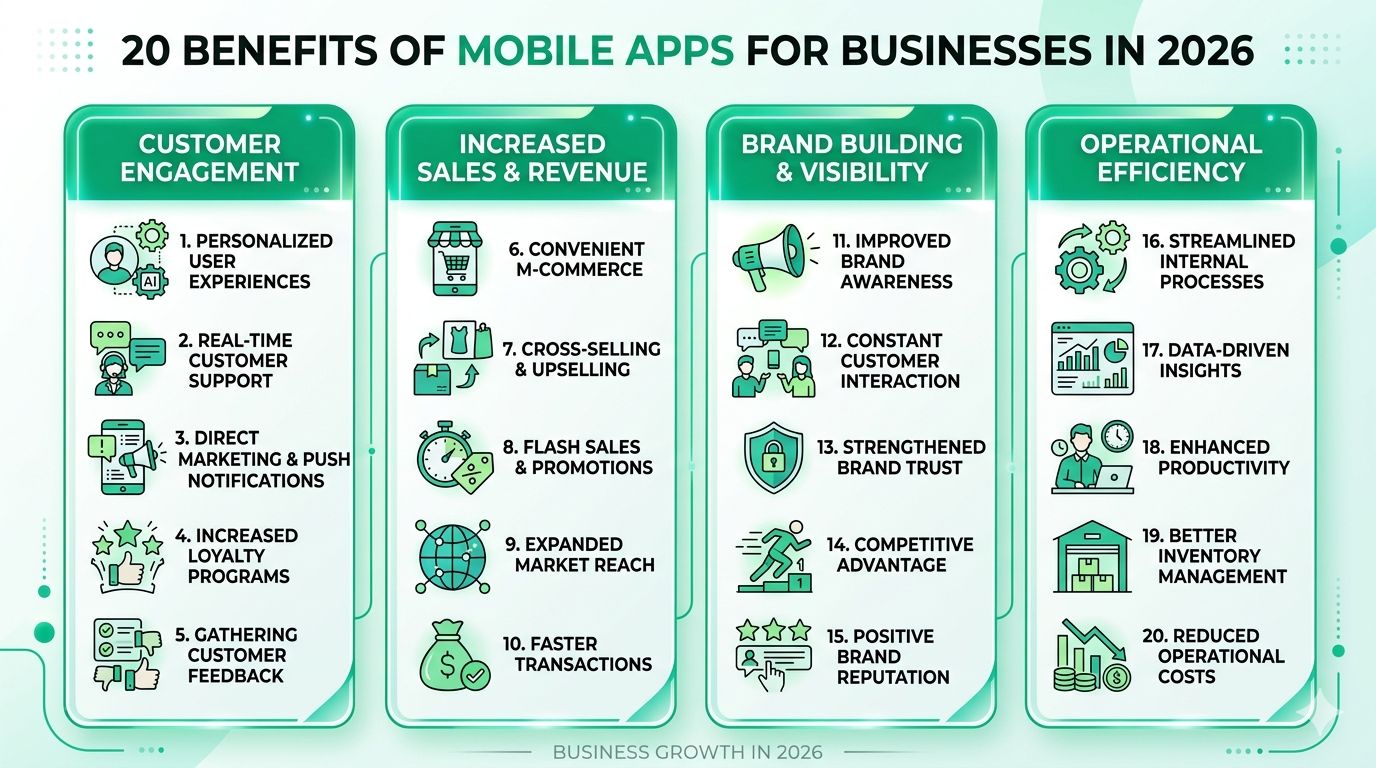
20 Benefits of Mobile Apps for Businesses in 2026
Picture two business owners. Same industry, same city, similar budgets.
One launched a mobile app 18 months ago. Today, 60% of their repeat orders come through it, their push notifications pull in more revenue than their email list, and their customer data is a goldmine they own outright.
The other one kept saying, "We'll build it later."
Later is here. And it's looking a bit awkward.
If you're trying to justify a mobile app investment — whether to a skeptical board, a cautious CFO, or just yourself — you've probably seen the generic "mobile is the future!" blog posts. They don't help much, do they?
This one is different. Below, you'll find 20 concrete benefits of mobile apps for businesses, grouped by theme, with real context, honest warnings, and enough 2026-specific detail to make your case properly. We cover customer experience wins, revenue and growth levers, brand and marketing advantages, and the operational and intelligence gains that most people overlook entirely.
Whether you're considering a customer-facing app, an internal employee tool, or both — this is the guide you need.
What Is a Business Mobile App? (Setting the Stage)
Before we get into the benefits, let's quickly make sure we're talking about the same thing.
A business mobile app is purpose-built software installed on a smartphone or tablet — downloaded from the Apple App Store or Google Play — and designed to serve a specific business function. That could mean serving customers, streamlining operations, or both.
There are three main types:
| App Type | Who It Serves | Common Examples |
|---|---|---|
| Customer-facing | Your end users or buyers | E-commerce apps, booking apps, loyalty apps |
| Internal / Employee | Your team | Field service tools, logistics trackers, HR apps |
| Hybrid | Both | Marketplace apps, two-sided platforms |
A mobile app is not the same as a mobile website
This is one of the most common mix-ups, so let's clear it up fast.
A mobile-responsive website adjusts its layout to fit a smaller screen. It's useful, but it lives in a browser. A mobile app lives on the device itself, which means it can do things a website simply can't:
- Work offline (or in low-signal environments)
- Send push notifications to a user's lock screen
- Access device hardware: camera, GPS, accelerometer, biometric sensors
- Store data locally for faster load times
- Integrate with wearables and connected devices
Why 2026 specifically?
Mobile now accounts for the majority of global web traffic. More importantly, the expectations have shifted. Users compare your app to the best one they've used — not to your competitors' apps. AI is now a standard feature in well-built apps, not a differentiator. And with third-party cookies largely gone, app-generated first-party data has become one of the most valuable assets a business can own.
Simply put: the bar is higher, the tools are better, and the gap between businesses with apps and those without is getting harder to close.
The 20 Benefits of Mobile Apps for Businesses in 2026
Group 1 — Customer Experience & Engagement
Benefit 1 — Direct, Always-On Customer Access
Here's something remarkable: every time a customer unlocks their phone, your brand is sitting right there on their home screen. No Google search. No Instagram algorithm deciding whether to show them your post. No competitor ad stealing the click.
Your app is a direct line to your customer, and you own it entirely.
According to data.ai (formerly App Annie), mobile users spend the overwhelming majority of their screen time inside apps — not browsers. That means if you're only present on the web, you're fishing in a much smaller pond.
Compare the two experiences:
- Website visit: Customer has to remember your URL (or search it), compete with paid ads, load a browser, navigate to the right page.
- App: One tap. They're in.
Even when a user isn't actively opening your app, the icon itself is a passive brand impression delivered multiple times a day. That kind of low-effort brand recall is genuinely hard to put a price on.
Benefit 2 — Faster, Smoother User Experience
Apps are built to run natively on a device. They store data locally, talk directly to device hardware, and don't have to render a fresh page from a remote server every time a user taps something. The result? They feel snappy in a way that mobile browsers rarely do.
Apple and Google also enforce minimum performance standards before allowing an app into their stores — which creates a quality floor you don't get on the open web.
What this looks like in practice:
A checkout flow in a well-built app might be: 1. Tap item → Add to basket 2. Tap checkout → Payment info pre-filled 3. Authenticate with Face ID or fingerprint → Done
That same journey on a mobile browser often involves re-entering card details, fighting with a small keyboard, and hoping the session doesn't time out.
⚠️ Worth knowing: A slow or buggy app is worse than no app at all. It creates a negative brand association that's hard to undo. Performance isn't a nice-to-have — it's the entire foundation.
On the technical side: if you've heard that cross-platform frameworks (Flutter, React Native) are slower than native apps, that gap has largely closed. For most business use cases in 2026, cross-platform is a perfectly solid choice.
Benefit 3 — Personalised User Experiences at Scale
Your app knows things your website doesn't. It knows what a customer browsed last Tuesday, which products they keep returning to, where they're located right now, and what time of day they usually open it. With that information, you can serve a genuinely tailored experience — automatically, at scale.
What this looks like in 2026:
A retail app might show a completely different homepage depending on:
- The last product category the user browsed
- Whether it's morning (commute mode) or evening (browse mode)
- Local weather (surfacing rain jackets when it's overcast)
- Purchase history (reorder prompts for consumables)
The AI-powered personalisation engines that make this possible are now running on-device — which means real-time decisions without round-tripping to a server, and without exposing user data externally.
One important note: personalisation requires user consent. Be upfront about what data you collect and what you do with it. When the value exchange is clear ("we use your purchase history to show you things you'll actually want"), most users opt in willingly. Frame it as a trust-building exercise, not a data grab.
Benefit 4 — Push Notifications: The Highest-ROI Marketing Channel
Let's be direct: push notifications outperform email on open rates by a significant margin. Users have to actively dismiss them. They appear on the lock screen. Done right, they're one of the most powerful re-engagement tools available to any business.
Types of push notifications worth knowing:
| Type | Trigger | Example |
|---|---|---|
| Transactional | User action | "Your order has shipped" |
| Promotional | Business decision | "Flash sale — 4 hours only" |
| Behavioural | In-app pattern | "You left something in your basket" |
| Geofenced | Physical location | "You're near our store — here's 15% off" |
In 2026, rich push notifications let you include images, quick-reply buttons, and deep links that open a specific screen inside your app — not just the app's home screen.
⚠️ The catch: Over-notifying is the fastest way to get uninstalled. Respect your users. Give them a notification preference centre. Set frequency caps. And test your copy — small wording changes drive big differences in tap rates.
Benefit 5 — Offline Functionality
No signal? No problem — if you've built for it.
Apps can cache content and enable key user actions without a data connection. That could mean:
- A customer browsing your product catalogue on the Tube
- A field technician logging job data in a basement or rural location
- A user reading saved articles on a flight
When connectivity returns, everything syncs automatically.
This is a capability that's completely unavailable to standard mobile websites. Progressive Web Apps (PWAs) partially bridge the gap, but they remain limited compared to a native or cross-platform app.
For businesses with field teams, delivery operations, or customers in areas with patchy coverage, offline functionality isn't a bonus feature — it's a business requirement.
Benefit 6 — Loyalty Programmes & Customer Retention
Keeping a customer is cheaper than finding a new one. Apps make retention mechanics significantly easier to manage than third-party loyalty platforms or paper punch cards (yes, some businesses still use those).
Built-in loyalty features might include:
- Points earned per purchase, redeemed in-app
- Tiered membership levels with unlocking benefits
- Streak rewards for daily or weekly engagement
- Gamified challenges (spend £X this month, unlock a reward)
The Starbucks app is the most cited example of this done well. Their loyalty programme drives a substantial share of US transactions through the app, and their active Rewards membership runs into the tens of millions — all figures they report publicly in their investor relations materials.
The key insight from Starbucks isn't just the loyalty mechanics — it's that the app gives them a direct, data-rich relationship with their best customers that no third-party platform can replicate.
Tip: Connect your loyalty data to your CRM. Understanding the relationship between app engagement and lifetime customer value is where the real strategic insights live.
Group 2 — Revenue & Business Growth
Benefit 7 — Increased Sales & Higher Conversion Rates
In-app purchase rates consistently outperform mobile web. The reasons stack up:
- Biometric checkout: Face ID and fingerprint authentication reduce the payment confirmation step to less than a second
- Saved payment details: No fumbling for a card — payment methods are stored securely
- Thumb-zone design: Interactive elements placed in the lower half of the screen are easier to reach on modern large-screen phones
- Deep link re-engagement: A push notification about an abandoned basket can take the user directly back to their cart, not the homepage
- One-tap reordering: For repeat purchases, the friction between "want it" and "ordered" can be reduced to a single tap
If your business depends on mobile commerce, the conversion rate difference between a well-built app and a mobile browser experience is not marginal — it's substantial.
Benefit 8 — New and Diversified Revenue Streams
An app doesn't just improve your existing revenue — it can create entirely new ones.
Revenue models available in apps:
- In-app purchases: One-time consumables, premium features, digital goods
- Subscription tiers: Freemium base layer → paid upgrade (more on this in Benefit 9)
- In-app advertising: Relevant for apps with large, engaged audiences (media, communities, utilities)
- Affiliate and partnership integrations: Sponsored content, exclusive partner offers surfaced to relevant users
⚠️ The golden rule: Never let revenue mechanics interfere with the core app experience. Users will forgive a lot, but they won't forgive an app that feels like a checkout queue dressed up as a product.
Benefit 9 — Subscription & Recurring Revenue Models
Apps and subscriptions are a natural match. Apple App Store and Google Play both support auto-renewing subscriptions with slick billing flows — meaning users can subscribe in a couple of taps without ever entering card details.
For businesses, recurring revenue from subscriptions creates predictable monthly recurring revenue (MRR) instead of lumpy, unpredictable one-off sales.
A few honest notes on the economics:
- Apple and Google take a 15–30% cut of in-app subscription revenue (15% for subscriptions held longer than a year, 30% initially for most developers)
- This is worth it for most businesses because of the billing infrastructure, fraud protection, and trust signal they provide
- Offering a free trial tier consistently improves trial-to-paid conversion rates compared to equivalent web flows
The subscription economy is still growing, and the businesses that don't offer recurring models risk being undercut by those that do.
Benefit 10 — Location-Based Marketing & Geofencing
If you have physical locations — shops, venues, service areas — geofencing is one of the most underutilised tools in mobile marketing.
How it works: You define a virtual boundary around a geographic area (your store, a competitor's store, an event venue). When an app user enters that zone, a triggered notification fires.
Use cases:
- Alert shoppers to an in-store promotion the moment they're nearby
- Notify event attendees when doors open or when a session is about to start
- Route field sales reps to their next appointment
- Trigger a competitor-comparison offer when users enter a rival location (check local marketing regulations before doing this)
In 2026, AI layers on top of geofencing can predict when a user is likely to be near a location based on their movement patterns — enabling proactive outreach before they've even arrived.
⚠️ Consent first, always: Location data is among the most sensitive personal information you can collect. Make the opt-in explicit, explain the value clearly, and never collect more data than you actually use.
Benefit 11 — App Store Optimisation (ASO) as a Discovery Channel
Most businesses think of the App Store and Google Play purely as distribution mechanisms. They're also search engines — and highly intent-driven ones at that.
When someone searches "restaurant booking app" or "project management tool for small business" in the App Store, they're not browsing. They're actively looking for a solution. That's a different — and often better — buying signal than a Google web search.
The ASO opportunity:
- Far less keyword competition than Google web search in most niches
- Ratings and review volume directly impact your ranking
- Screenshots and preview videos are your above-the-fold conversion assets — treat them like a landing page, not an afterthought
- Localisation (translating your App Store listing) opens international discovery with minimal extra effort
Tip: Encourage reviews at peak satisfaction moments — right after a successful purchase, after a positive customer service interaction, after a user achieves something meaningful in your app. Keep the review request contextual and well-timed; random pop-ups get dismissed.
Benefit 12 — Competitive Differentiation
In many industries — local services, B2B tools, hospitality, healthcare — having a polished, well-maintained app while competitors are relying on a mobile website is a meaningful differentiator.
Apps signal something about a business: that it takes its digital experience seriously, that it's invested in its customers' time, and that it has the resources and commitment to maintain a proper product.
In 2026, in mobile-dominant verticals, not having an app is starting to look like not having a website looked in 2010. The clock is ticking.
⚠️ One important caveat: Don't build an app just to "have one." An underbuilt, unmaintained, buggy app does more damage to your credibility than no app at all. Build it when you have a clear use case, and build it properly.
Group 3 — Brand, Marketing & Communication
Benefit 13 — Stronger Brand Identity & Recall
Every time a user unlocks their phone, they see your app icon. That's a brand impression delivered for free, multiple times a day, with zero ad spend.
But the brand benefits go deeper than the icon:
- Controlled environment: On Instagram or TikTok, your brand is competing with hundreds of distractions. In your app, you have the full stage. Typography, colour, motion design, tone of voice — all yours.
- Consistency: Your app can enforce brand standards in a way that social media posts, emails, and third-party platforms can't.
- Dark mode and dynamic theming: In 2026, apps that respond beautifully to a user's system preferences (light/dark mode, dynamic colour in iOS 18+) feel polished and considered.
Tip: Invest in a distinctive app icon — it should be instantly recognisable at 60px on a crowded home screen. A generic gradient blob won't cut it.
Benefit 14 — Social Media & Platform Integration
Your app doesn't have to live in isolation. When built with smart sharing mechanics, it becomes a content engine that turns your most engaged users into brand advocates.
What this looks like in practice:
- Users share a purchase, an achievement, or a result directly from the app to their social feeds
- Social login (Sign in with Apple, Sign in with Google) reduces signup friction dramatically — fewer drop-offs at onboarding
- User-generated content features (reviews, photos, referral links) generate authentic social proof that no ad can replicate
Tip: Give users something genuinely worth sharing — a discount code, a milestone achievement, a personalised result. Asking people to "share this post" when there's nothing in it for them is a proven dead end.
⚠️ Worth knowing: If your app's core features depend heavily on third-party social APIs, you're exposed to those platforms' decisions. Meta and others have a history of restricting API access without much warning.
Benefit 15 — Cost-Effective, Owned Marketing Channel
Once a user has installed your app and opted into notifications, your marginal cost to reach them is essentially zero. No CPM. No ad auction. No algorithm deciding your "reach."
Compare that to:
- Paid social: You pay every time you want to reach an audience you don't own
- Email: Solid ROI, but open rates are declining and spam filters are getting smarter
- In-app messaging: Near-zero cost, highest intent audience, full control
Your app users are self-selected — they downloaded it because they wanted to engage with your business. Every message you send them is going to a warmer audience than almost any other channel you have.
The economics compound over time: the cost of acquiring an app install is a one-time event. The channel value accumulates for the lifetime of the relationship.
Tip: Use in-app messages for onboarding, feature announcements, and upsell moments. Reserve push notifications for high-value re-engagement — don't burn your most direct channel on low-priority messages.
Benefit 16 — Augmented Reality (AR) & Immersive Features
AR in mobile apps might sound like a sci-fi feature reserved for tech giants — but in 2026, it's increasingly accessible to businesses of all sizes, and it's solving a genuine customer problem: purchase uncertainty.
The biggest reason people don't buy? They're not sure if it'll look right, fit properly, or suit their space.
Where AR is already working:
- Furniture retail: Visualise a sofa in your living room before ordering (IKEA Place is the go-to example)
- Fashion: Virtual try-on for glasses (Warby Parker), clothes, and accessories
- Beauty: Live makeup simulation using the phone camera
- Real estate: Virtual staging of empty properties
Apple's ARKit and Google's ARCore have matured significantly — building a meaningful AR feature no longer requires a team of specialist engineers or an enterprise-level budget.
Tip: Don't try to AR-ify your entire app. Start with one high-impact use case — the feature that most directly addresses the "but will it actually work for me?" hesitation in your customers' decision-making process.
Group 4 — Operations, Intelligence & Internal Benefits
Benefit 17 — Rich Analytics & First-Party Customer Data
Your app generates a level of behavioural insight that websites simply can't match. Not just pageviews — but session length, feature usage frequency, where users tap, where they abandon, how long they hesitate before purchasing, and which journeys lead to the highest lifetime value.
In the post-cookie era, this kind of first-party data is a strategic asset. It's data you own outright. No platform can take it from you. No privacy regulation will make it disappear (as long as you've collected it properly). And your competitors can't buy it.
Tools worth knowing in 2026:
| Tool | Best for |
|---|---|
| Firebase Analytics | Apps already on Google infrastructure; free tier is generous |
| Mixpanel | Event-based tracking, funnel analysis, cohort retention |
| Amplitude | Product analytics at scale; excellent retention and journey mapping |
Tip: Define your analytics taxonomy before launch. Instrumenting your app for tracking after the fact is expensive, time-consuming, and often incomplete. Know what questions you want to answer, then build the data collection around those questions.
Benefit 18 — Improved Internal Operations & Employee Productivity
Customer-facing apps get most of the attention, but internal employee apps often deliver faster and more measurable ROI.
Think about the daily friction in your operations:
- A field technician filling out paper job sheets that someone has to manually re-enter
- A warehouse team working from printed pick lists
- A new hire sifting through a 200-page PDF onboarding document
- A manager pulling reports from three disconnected systems
An internal app built around those specific pain points can eliminate hours of wasted time per employee per week.
Common internal app use cases:
- Mobile inventory management
- Real-time delivery tracking and route optimisation
- Digital onboarding and training
- Field sales support with offline-capable CRM access
- Internal knowledge bases and policy search
The 2026 addition: AI assistants embedded in internal apps — capable of summarising reports, flagging operational anomalies, or answering policy questions in natural language — are now within reach of mid-size businesses, not just enterprises.
⚠️ The real risk: Employee adoption is the number one failure mode for internal apps. An app that people don't use is just expensive software sitting idle. Involve the actual end users in the design process from day one. Their buy-in isn't a nice-to-have — it determines whether the whole project succeeds.
Benefit 19 — Enhanced Security & Customer Trust
Apps can leverage security features that mobile websites simply can't access:
- Biometric authentication: Face ID and fingerprint unlock aren't just convenient — they're more secure than most passwords
- Hardware-backed keystores: Sensitive credentials can be stored in secure hardware on the device, not just in software
- Encrypted local storage: Data stored on the device can be encrypted at rest
- Platform-managed payments: Apple Pay and Google Pay handle the heavy lifting of PCI compliance
Users increasingly trust apps over mobile websites for sensitive transactions — banking, healthcare, high-value e-commerce. Apple's App Store review process in particular acts as a trust signal: users know that something has been vetted before it reached them.
⚠️ Security must be designed in, not bolted on. The most common vulnerabilities in business apps are insecure data storage (saving sensitive information in unprotected local files) and weak API authentication (endpoints that don't properly validate who's calling them). These aren't afterthoughts — they need to be addressed in architecture, not in post-launch patches.
Benefit 20 — Integration With Emerging Technology (IoT, Wearables & AI)
Your mobile app isn't just a standalone product — it's the control layer for a growing ecosystem of connected technology.
What this means today:
- Smart home devices, connected equipment, and industrial IoT sensors all need a control interface — and that interface is almost always a mobile app
- Apple Watch, Wear OS, and fitness trackers extend your app's utility to the wrist — timely micro-notifications without requiring the user to pull out their phone
- On-device AI (running locally on the phone, without sending data to a cloud server) enables real-time language processing, image recognition, and predictive features with minimal latency and improved privacy
What this means for the future:
Businesses that build solid app infrastructure now — with an API-first backend — are positioning themselves to extend into AI agents, spatial computing platforms (Vision Pro and whatever follows), and connected device ecosystems. The cost of retrofitting this later is significantly higher than building it right the first time.
Tip: Even if you don't need IoT or wearable integration today, build your backend as a set of clean APIs that your app consumes. This future-proofs integrations and makes it dramatically faster and cheaper to extend your product later.
Common Mistakes (And How to Avoid Them)
Even with the best intentions, plenty of businesses get mobile apps wrong. Here's what to watch out for.
Mistake 1 — Building Without Validating the Use Case
The most expensive app you can build is one that solves a problem nobody has.
Before a single line of code is written, talk to actual users. Run surveys. Build low-fidelity prototypes and watch real people try to use them. The discovery phase feels slow — but it's the only way to know if you're building something people actually want.
⚠️ An app built on assumptions rather than user research is not a product launch. It's an expensive experiment.
Mistake 2 — Replicating the Website Inside an App
An app is not a shrunken version of your website. The two serve fundamentally different behavioural contexts.
Websites are for discovery. Apps are for doing. Build your app around one or two specific, recurring tasks and do them exceptionally well. Resist the urge to mirror every page of your site.
Mistake 3 — Neglecting Post-Launch Maintenance
"Build it and forget it" is not a mobile strategy. Apps require ongoing OS updates, security patches, and feature refreshes — because Apple and Google regularly update their operating systems, and if you're not keeping pace, your app breaks or gets delisted.
Maintenance typically costs 15–20% of the original build cost annually. Budget for it upfront, or plan for unpleasant surprises.
⚠️ An app with a 2.8-star rating in the App Store actively damages brand perception. Negative reviews compound quickly when maintenance is deprioritised.
Mistake 4 — Over-Notifying Users
Push notification abuse is the number one cause of app uninstalls. Once a user turns off notifications or uninstalls the app, they're extremely unlikely to come back.
Best practices:
- Give users a notification preference centre from day one
- Set frequency caps — even if a user is in five triggered segments simultaneously
- Only send notifications that deliver genuine value to the recipient
Mistake 5 — Ignoring App Store Optimisation at Launch
Most businesses launch with the bare minimum metadata and miss out on organic installs from day one. Your App Store listing is a conversion page — treat it like one.
Invest in:
- Keyword-researched title and description
- Professional screenshots that show, not tell
- A preview video that demonstrates the core use case in the first five seconds
Mistake 6 — Underestimating User Onboarding
Users who don't understand your app's value within their first session rarely come back. First impressions matter more in mobile than almost anywhere else.
Good onboarding:
- Is progressive — it reveals features when they're relevant, not all at once
- Uses contextual tooltips rather than lengthy tutorial screens
- Is designed around the "aha moment" — the earliest point at which a user experiences genuine value
Expert Tips & Best Practices
Prioritise Performance Above All Else
Target sub-3-second load times and smooth 60fps scrolling. These are the benchmarks users have been trained to expect by the best apps in the world — and anything below them creates a subtle but real sense of dissatisfaction.
Use crash reporting tools like Crashlytics or Sentry from day one. You want to know about crashes before your users tell the App Store about them.
Design for Accessibility
Accessible apps expand your addressable market and reduce legal risk (ADA compliance in the US, EN 301 549 in Europe).
Practical checklist:
- Minimum 44×44pt tap target sizes
- Sufficient colour contrast ratios (WCAG AA as a baseline)
- Full support for VoiceOver (iOS) and TalkBack (Android)
- Support for dynamic text sizing
Use a Mobile-First Analytics Strategy
Don't just pipe your mobile data into a desktop analytics framework and call it done. Mobile user behaviour is fundamentally different — session lengths, navigation patterns, and conversion paths don't map neatly onto desktop analytics models.
Set up funnel tracking, retention cohorts, and crash reporting before your first user hits the app. Retroactive instrumentation is painful and usually incomplete.
Adopt an API-First Architecture
Build your backend as a collection of APIs that your app consumes — not a monolithic system with a mobile layer tacked on. This approach:
- Future-proofs integrations with web, wearables, and third-party tools
- Makes it significantly faster and cheaper to build a companion web app later
- Enables third-party integrations without architectural rebuilds
Plan Your App Store Review Strategy from Day One
Respond to every review, positive or negative, publicly. It signals care to prospective users who are reading reviews before downloading — and they do read them.
Use in-app prompts to request reviews at peak satisfaction moments: right after a successful purchase, after a user completes an achievement, after a positive support interaction. Context matters — a well-timed review request converts far better than a random pop-up.
Real-World Examples
Starbucks — Loyalty & Personalisation Done Right
The Starbucks app is one of the most studied examples of app-driven loyalty in retail. Their Rewards programme drives a substantial proportion of US transactions through the app, and their loyalty membership numbers run into the tens of millions — all figures disclosed in their public investor relations reports.
The lesson isn't just "have a loyalty programme." It's that the app gives Starbucks a direct, data-rich, unmediated relationship with their most valuable customers. That relationship lives entirely outside the control of any social platform or search engine.
IKEA Place — AR Reducing Purchase Hesitation
IKEA's AR app feature lets users visualise furniture in their actual home before ordering. The premise is simple: the number one reason people hesitate on a furniture purchase is uncertainty about whether it'll fit and look right. AR removes that hesitation.
IKEA has shared positive engagement figures for the feature in press interviews — it's worth looking at their press releases for current data at the time you're reading this.
Domino's — Digital-First as a Competitive Moat
Domino's transformation into a "technology company that happens to sell pizza" is well-documented in business media. Their digital ordering — with the app at the centre — now accounts for the majority of their sales. Their app is consistently cited as a key driver of their market share gains over competitors who were slower to invest in the digital experience.
Uber — Internal and External Apps Working Together
Uber runs two separate apps: one for riders, one for drivers. Each is optimised for the specific needs and context of its user group. This separation is a useful model for any business that serves multiple distinct user types — and a reminder that "internal app" and "customer app" can co-exist as a broader mobile strategy.
Frequently Asked Questions
Do small businesses really need a mobile app, or is a mobile website enough?
It depends on how often your customers interact with your business. If they're booking, ordering, or tracking something regularly — more than once a month — an app adds clear value. For genuinely infrequent, one-off interactions (hiring a plumber, booking a once-a-year event), a well-optimised mobile site may be perfectly sufficient.
Progressive Web Apps (PWAs) are worth mentioning as a middle-ground option. They install from a browser, can send push notifications, and work offline to a degree — but they lack access to full device hardware and don't appear in app stores, which limits discovery.
How much does it cost to build a business mobile app in 2026?
Honest ranges:
| Build Type | Typical Cost Range |
|---|---|
| Simple app (basic features, one platform) | £12,000 – £40,000 |
| Medium complexity (custom features, iOS + Android) | £40,000 – £150,000 |
| Enterprise-grade (complex integrations, high security) | £150,000 – £500,000+ |
The figure that's most often underestimated: ongoing maintenance, which typically runs at 15–20% of the original build cost per year. Budget for it before you start.
For an accurate estimate, get a proper scoping session with a development agency or experienced freelance team — ballpark figures without a spec are rarely meaningful.
Should I build for iOS, Android, or both?
Research your target audience's device demographics first. Android holds majority market share in most global markets. iOS leads in the US, UK, and high-income demographics.
In 2026, cross-platform frameworks like Flutter and React Native make "build once, deploy to both" viable for most business app use cases. Unless you have very specific performance or hardware requirements, starting cross-platform is almost always the right call.
How long does it take to develop a business mobile app?
| Complexity | Typical Timeline |
|---|---|
| Simple MVP | 3–6 months |
| Medium complexity | 6–12 months |
| Enterprise-grade | 12–24 months |
A strong recommendation: start with an MVP (Minimum Viable Product) — the smallest version of your app that delivers genuine value to users. Launch it, gather real feedback, and iterate. Building the full vision before anyone's used it is how feature bloat and missed launches happen.
How do I measure whether my app is actually working?
Define your North Star Metric before launch — the single number that best captures whether your app is delivering value (e.g., weekly active users, orders placed per month, retention rate at Day 30).
Supporting metrics to track:
- DAU / MAU: Daily and monthly active users — the ratio tells you how "sticky" your app is
- Retention rate at Day 1, Day 7, Day 30: Industry averages sit around 25% / 11% / 6% — beating those is a good sign
- Session length: Are users spending meaningful time in the app?
- Conversion rate: Are in-app visits turning into the actions you care about?
- Uninstall rate: Rising uninstalls are an early warning sign worth investigating immediately
What's the difference between a native app and a cross-platform app?
| Type | Built with | Performance | Cost |
|---|---|---|---|
| Native iOS | Swift / SwiftUI | Best possible | High |
| Native Android | Kotlin | Best possible | High |
| Cross-platform | Flutter / React Native | Very good | Lower |
For most business apps in 2026, cross-platform is the right starting point. The performance gap versus native has largely closed for typical business use cases, and the cost and maintenance savings are significant.
How do I get users to actually download and use my app?
- ASO: Make your App Store listing work as a conversion page from day one
- Existing channels: Email your current customers with a clear reason to download (an exclusive offer, a feature they don't have access to elsewhere)
- QR codes: In-store, on packaging, on your website — make it easy to reach the download page from anywhere
- Incentivise the first download: A discount, loyalty points, or an exclusive feature that's genuinely valuable
⚠️ On paid install campaigns: They can inflate your download numbers quickly, but users acquired this way often churn fast. Prioritise organic and owned-channel promotion — the installs are higher quality and the economics are better long-term.
Conclusion
Here's the 30-second version of everything above:
- Customer experience: Apps give you a direct, always-on, owned channel with the power to personalise at scale, send high-ROI notifications, and keep users engaged between purchases.
- Revenue and growth: Higher conversion rates, new revenue streams, subscription models, and location-based marketing all become significantly more accessible through a well-built app.
- Brand and marketing: Your app is a controlled brand environment, a cost-free marketing channel, and — with AR — a way to remove the purchase hesitation that costs you sales every day.
- Operations and intelligence: First-party data, internal productivity tools, device-level security, and future-proof integration with AI, wearables, and connected devices are where the next competitive edges are forming.
Is It Time for Your Business to Build an App?
Run this quick self-check:
- Do your customers interact with your business more than once a month?
- Do you have data worth owning — purchase history, preferences, behavioural patterns?
- Do your competitors have an app while you don't?
- Do your internal teams have operational friction that a purpose-built tool could solve?
If you answered yes to any of these, the answer is probably yes.
Four Next Steps
1. Audit your current mobile experience — how well does your mobile website actually serve frequent users? Where does it fall short? 2. Define your single most impactful use case — what one thing would an app do significantly better than your website? 3. Research your build options — native vs. cross-platform vs. low-code, internal team vs. agency. The right answer depends on your use case, timeline, and budget. 4. Set a success metric before you spend a penny — know what "working" looks like before you start. A clear definition of success is the best safeguard against building the wrong thing.
The businesses that will lead their categories in the next five years are making these decisions now — not later.
Last updated: 2026 | Target keyword: benefits of mobile apps for businesses | Supporting keywords: mobile app advantages, business mobile app 2026, mobile app ROI, why build a mobile app, mobile app vs website