Deep Links in WebView Android and iOS Apps: Universal Links & App Links — The Complete Developer Guide
What Are Deep Links, and Why Do They Behave Differently Inside a WebView?
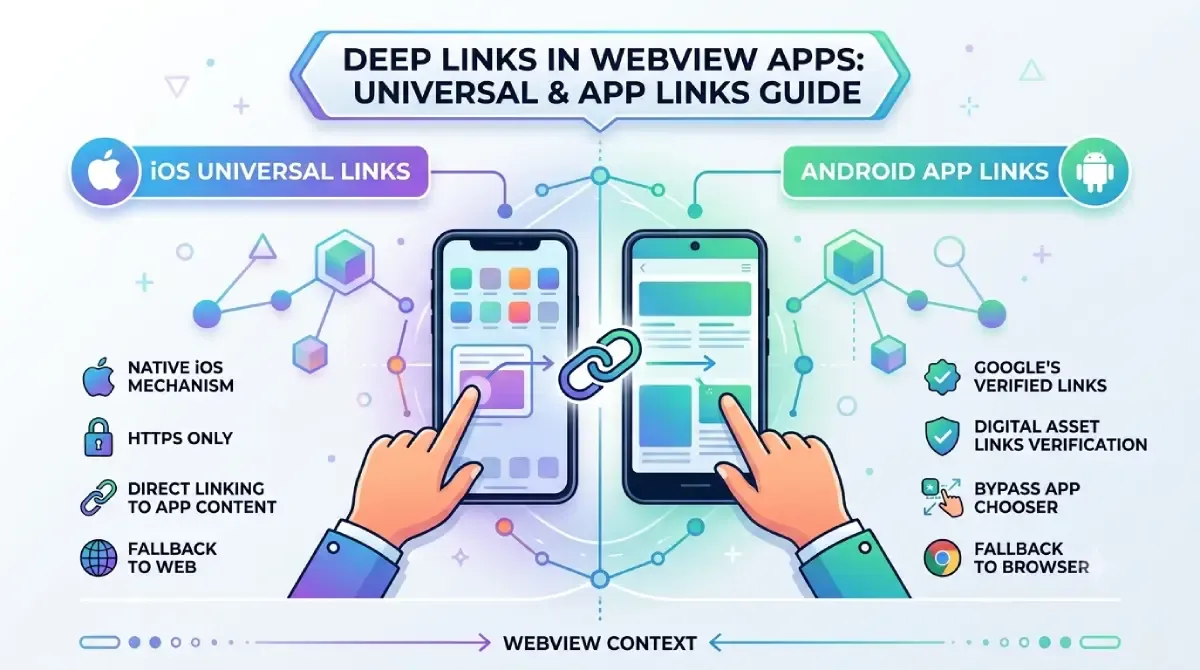
A deep link is a URL that takes a user to a specific screen inside a mobile app — not just the app's home screen. When that URL is opened inside a WebView rather than the device's OS or default browser, the standard routing chain breaks entirely. The WebView intercepts the URL before the OS can touch it, which means Android App Links and iOS Universal Links silently fail unless you write explicit code to handle them.
This is the source of most deep link confusion in hybrid and WebView-based apps. Native links feel like they "just work" — WebView links don't, and the failure mode is invisible: the user either sees a 404, a broken web page, or nothing at all.
The four types of deep links every developer must know
- Custom URI schemes (
myapp://path) — the oldest method. The OS doesn't verify these, any app can register the same scheme, and they carry real hijacking risk. Still widely used, but strongly deprecated for externally-shared links by both Apple and Google as of 2024–2025. - Android App Links (
https://) — verified at the OS level using aassetlinks.jsonfile you host on your domain. Require explicit intent filter configuration inAndroidManifest.xml. - iOS Universal Links (
https://) — verified by Apple using anapple-app-site-association(AASA) file on your domain. Require Associated Domains configured in Xcode. - Deferred deep links — work even when the app isn't installed yet. Implemented via third-party SDKs (Branch, Adjust, AppsFlyer). Out of scope for this post, but worth knowing they exist.
| Custom URI Scheme | Android App Links | iOS Universal Links | Deferred Deep Links | |
|---|---|---|---|---|
| Platform | Both | Android | iOS | Both |
| Verification required | No | Yes (assetlinks.json) | Yes (AASA) | No (SDK-handled) |
| Works when app not installed | No | No (fallback to web) | No (fallback to web) | Yes |
| Fallback behavior | Error / nothing | Web browser | Web browser | App Store + deferred routing |
| WebView behavior | Fails unless intercepted | Fails unless intercepted | Fails unless intercepted | Fails unless intercepted |
Notice the last row: all four types fail in a WebView if you don't intercept them. The interception logic is what this guide is about.
Why the WebView problem happens
A WebView renders web content in an isolated in-app browser. On Android it doesn't fire Intent resolution — it bypasses the OS intent system entirely. On iOS, WKWebView intentionally suppresses Universal Link handling by design (sandboxing). Custom schemes can also leak between WebViews and the OS in unexpected ways if you're not careful.
Quick-reference glossary
| Term | Platform | What it is |
|---|---|---|
| App Links | Android | HTTPS deep links verified via Digital Asset Links |
| Universal Links | iOS | HTTPS deep links verified via the AASA file |
| Digital Asset Links | Android | JSON file proving domain ↔ app ownership |
| AASA | iOS | JSON file proving domain ↔ app ownership |
shouldOverrideUrlLoading |
Android | WebView callback to intercept URL navigation |
WKNavigationDelegate |
iOS | Protocol to intercept URL navigation in WKWebView |
| Intent Filter | Android | Manifest declaration linking URL patterns to Activities |
| Associated Domains | iOS | Xcode entitlement linking domains to an app |
How Android App Links Work Inside a WebView
Android App Links are HTTPS links verified by the OS using assetlinks.json hosted on your domain — but inside a WebView, Android does not automatically route them to your app. Instead, you must intercept the URL inside shouldOverrideUrlLoading() and manually fire an Intent, otherwise the WebView simply loads the URL as a web page.
What actually happens at runtime
When a user taps an App Link in Gmail or Messages, the OS checks your intent filters, fetches assetlinks.json, verifies ownership, and opens the right Activity. When that same link is tapped inside your WebView, the WebView engine intercepts the navigation event first — the OS intent system is never consulted.
WebViewClient.shouldOverrideUrlLoading() is your intervention point. Don't confuse it with WebChromeClient — that one handles browser UI elements (titles, progress, JavaScript dialogs). URL interception lives in WebViewClient.
The assetlinks.json file
This file proves that your domain owns your app. The OS checks it at install time and periodically after that. Here's what matters:
- File path: must be exactly
https://yourdomain.com/.well-known/assetlinks.json - Hosting requirements: served over HTTPS,
Content-Type: application/json, no redirects (even a single 301 causes verification failure), no authentication on the URL - Key fields:
package_name(must exactly match your app's package name),sha256_cert_fingerprints(your signing certificate hash), and therelationvaluedelegate_permission/common.handle_all_urls
[{
  "relation": ["delegate_permission/common.handle_all_urls"],
  "target": {
    "namespace": "android_app",
    "package_name": "com.yourcompany.yourapp",
    "sha256_cert_fingerprints": [
      "AA:BB:CC:DD:EE:FF:00:11:22:33:44:55:66:77:88:99:..."
    ]
  }
}]
Get your SHA-256 fingerprint with: keytool -list -v -keystore your-release.jks -alias your-alias. For Play App Signing, grab it from the Google Play Console under Setup → App integrity.
Intent filters in AndroidManifest.xml
The android:autoVerify="true" attribute on your intent filter is what triggers App Link verification. Without it, your HTTPS links fall back to the app-chooser dialog (or nothing).
<activity android:name=".MainActivity" android:launchMode="singleTask">
  <intent-filter android:autoVerify="true">
    <action android:name="android.intent.action.VIEW" />
    <category android:name="android.intent.category.DEFAULT" />
    <category android:name="android.intent.category.BROWSABLE" />
    <data android:scheme="https"
          android:host="yourdomain.com"
          android:pathPrefix="/app" />
  </intent-filter>
</activity>
A few things to get right: declare both DEFAULT and BROWSABLE categories (both are required), use singleTask launch mode to prevent duplicate Activity stacks when a link opens an already-running app, and declare explicit paths — overly broad patterns are a security risk.
How iOS Universal Links Work Inside a WebView
iOS Universal Links are HTTPS URLs verified by Apple using an apple-app-site-association file — but inside WKWebView, Universal Links are suppressed by default. You must implement WKNavigationDelegate, intercept the URL in decidePolicyForNavigationAction, and call UIApplication.shared.open() to hand it back to the OS, which then routes it to the right screen.
What actually happens at runtime
When a Universal Link is tapped in Safari or Messages, iOS checks the AASA file, confirms the association, and opens your app. When that same URL is loaded inside a WKWebView, the WebView treats it as a regular web request and loads the page. Apple made this intentional — sandboxing. SFSafariViewController is the exception: it runs in a separate process with the full Safari context and does honor Universal Links. This is one reason developers prefer it for OAuth flows.
The apple-app-site-association (AASA) file
- File path:
https://yourdomain.com/.well-known/apple-app-site-association(no.jsonextension needed — Apple fetches both) - Hosting requirements: HTTPS only,
Content-Type: application/json, no redirects, file size under 1 MB, no authentication - Modern format uses a
componentsarray (iOS 13+); the olderpathsarray still works for backward compatibility
{
  "applinks": {
    "details": [{
      "appIDs": ["TEAMID1234.com.yourcompany.yourapp"],
      "components": [
        { "/": "/app/*", "comment": "Matches any path starting with /app/" },
        { "/": "/product/?id=*" },
        { "/": "/", "exclude": true, "comment": "Exclude root" }
      ]
    }]
  }
}
Pattern matching: ? matches a single character, * matches multiple characters, and EXCLUDE (or "exclude": true in the components format) tells iOS not to handle that path.
CDN caching: Apple caches AASA files aggressively. On iOS 17+, the CDN refreshes within roughly 24 hours (down from 72 hours). During development, use the ?mode=developer suffix on your Associated Domains entry to bypass the CDN and fetch directly from your server.
Associated Domains in Xcode
Go to Project settings → Signing & Capabilities → + Capability → Associated Domains. Add an entry: applinks:yourdomain.com. For local testing: applinks:yourdomain.com?mode=developer.
After adding the entitlement, regenerate your provisioning profile — it must include the Associated Domains capability or the entitlement is ignored at runtime.
What Changed in Deep Linking for 2025–2026
Between 2025 and 2026, both Apple and Google tightened verification, deprecated legacy components, and changed how hybrid frameworks handle WebView deep links. The biggest news: Firebase Dynamic Links reached end of life in December 2025. If you haven't migrated, your deep links are broken right now.
Android changes
Android 15 (API 35) introduced stricter autoVerify failure reporting — failures that previously surfaced only on the device are now logged more clearly in Logcat, which makes debugging faster. A new PackageManager API lets you check App Link verification status programmatically rather than guessing from logs. Google Play now flags apps where App Links fail verification, which can affect discoverability in the Store.
The shouldOverrideUrlLoading callback is still supported, but the newer WebViewCompat API is now preferred. Chrome Custom Tabs (CCT) now route Universal Links properly — relevant if your app uses CCT as a lightweight in-app browser rather than a full WebView.
iOS changes
UIWebView is gone. App Store submissions containing any UIWebView code are rejected as of 2024–2025. If you're still on it: migrate to WKWebView immediately — this isn't optional.
AASA propagation on iOS 17+ is now around 24 hours via Apple's CDN. TestFlight now enforces entitlement verification the same way the App Store does — the more lenient behavior from earlier versions is gone. Apple's iCloud Private Relay can affect AASA file fetching in some configurations; test on real devices with Private Relay enabled if your users are likely to have it on.
Cross-platform framework changes
- React Native:
react-native-webviewv13+ (aligned with the new Fabric/TurboModules architecture) changes some URL interception behaviour. Check the library's changelog before upgrading. - Flutter:
webview_flutterv4.x replaced the oldnavigationDelegatecallback with a newNavigationDelegateclass andonNavigationRequestmethod. - Capacitor 6 / Ionic:
App.addListener('appUrlOpen', ...)is the primary listener for incoming Universal Links; review the updatedallowNavigationconfiguration incapacitor.config.ts— misconfiguring it is a common source of link failures. - Expo SDK 51+:
expo-linking'suseURL()hook has improved behaviour for deep links inside Expo Go and WebViews.
Step-by-Step: Implementing Android App Links in a WebView App
To implement Android App Links in a WebView app, you need five things: a configured intent filter with autoVerify in AndroidManifest.xml, a valid assetlinks.json on your domain, URL interception in shouldOverrideUrlLoading(), intent handling in both onCreate() and onNewIntent(), and verification using ADB. Skip any one of them and you'll have a bug that's hard to reproduce.
Step 1: Configure AndroidManifest.xml
Add your Activity with android:launchMode="singleTask" and an intent filter marked android:autoVerify="true". Include every HTTPS path your WebView should intercept, and declare the scheme as https (Android requires you to list it explicitly).
<activity
  android:name=".MainActivity"
  android:launchMode="singleTask"
  android:exported="true">
  <intent-filter android:autoVerify="true">
    <action android:name="android.intent.action.VIEW" />
    <category android:name="android.intent.category.DEFAULT" />
    <category android:name="android.intent.category.BROWSABLE" />
    <data
      android:scheme="https"
      android:host="yourdomain.com"
      android:pathPrefix="/app" />
  </intent-filter>
</activity>
Step 2: Create and host assetlinks.json
Get your release SHA-256 fingerprint:
# From your keystore
keytool -list -v -keystore release.jks -alias your-alias | grep SHA256

# Verify hosting after upload
curl -I https://yourdomain.com/.well-known/assetlinks.json
# Must return: HTTP/2 200  and  content-type: application/json
List both your debug and release fingerprints in the file during development. Remove the debug one before production.
Step 3: Intercept URLs inside the WebView
webView.webViewClient = object : WebViewClient() {
    override fun shouldOverrideUrlLoading(
        view: WebView,
        request: WebResourceRequest
    ): Boolean {
        val url = request.url
        if (url.host == "yourdomain.com" && url.path?.startsWith("/app") == true) {
            val intent = Intent(Intent.ACTION_VIEW, url, this@MainActivity, DeepLinkActivity::class.java)
            startActivity(intent)
            return true  // We handled it — don't let WebView load it
        }
        return false  // Not a deep link — let the WebView load it normally
    }
}
The return false fallback is not optional. Every URL that doesn't match your pattern must be allowed through or users will hit blank screens.
Step 4: Handle the intent in onCreate() and onNewIntent()
override fun onCreate(savedInstanceState: Bundle?) {
    super.onCreate(savedInstanceState)
    handleDeepLink(intent)
}

override fun onNewIntent(intent: Intent) {
    super.onNewIntent(intent)
    handleDeepLink(intent)
}

private fun handleDeepLink(intent: Intent) {
    if (intent.action == Intent.ACTION_VIEW) {
        intent.data?.let { uri ->
            // Pass uri to your navigation router
            navigateTo(uri)
        }
    }
}
onNewIntent() fires when the Activity is already running (because of singleTask). If you only handle onCreate(), deep links that arrive while the app is backgrounded silently do nothing.
Step 5: Test with ADB
adb shell am start -a android.intent.action.VIEW -d "https://yourdomain.com/app/product/123" com.yourcompany.yourappTo check whether verification passed, query the Digital Asset Links API in a browser. A successful response contains your app's package name. For Logcat, filter by IntentFilterIntentSvc to see verification events.
Step-by-Step: Implementing iOS Universal Links in a WebView App
To implement Universal Links in a WKWebView app: enable Associated Domains in Xcode, host a valid AASA file, implement WKNavigationDelegate to intercept URLs, call UIApplication.shared.open() to hand them to the OS, and handle them in your AppDelegate or SceneDelegate. All five steps are required — the OS-level and runtime-level configuration are independent and both must be correct.
Step 1: Enable Associated Domains in Xcode
Go to Project settings → Signing & Capabilities → + Capability → Associated Domains. Add:
applinks:yourdomain.comFor local testing without waiting for the Apple CDN:
applinks:yourdomain.com?mode=developerRegenerate your provisioning profile after making this change. Verify the entitlement appears in your .entitlements file.
Step 2: Create and host the AASA file
Construct your App ID: TEAMID.com.yourcompany.yourapp. Host the file at https://yourdomain.com/.well-known/apple-app-site-association.
{
  "applinks": {
    "details": [{
      "appIDs": ["TEAMID1234.com.yourcompany.yourapp"],
      "components": [
        { "/": "/app/*" },
        { "/": "/product/?id=*" }
      ]
    }]
  }
}
Check Apple's cached copy at: https://app-site-association.cdn-apple.com/a/v1/yourdomain.com
Step 3: Intercept URLs in WKNavigationDelegate
extension ViewController: WKNavigationDelegate {
    func webView(
        _ webView: WKWebView,
        decidePolicyFor navigationAction: WKNavigationAction,
        decisionHandler: @escaping (WKNavigationActionPolicy) -> Void
    ) {
        guard let url = navigationAction.request.url else {
            decisionHandler(.allow)
            return
        }

        if isUniversalLink(url) {
            UIApplication.shared.open(url, options: [:], completionHandler: nil)
            decisionHandler(.cancel)  // Stop the WebView from loading it
            return
        }

        decisionHandler(.allow)  // Not a Universal Link — let WebView handle it
    }

    private func isUniversalLink(_ url: URL) -> Bool {
        return url.host == "yourdomain.com" &&
               (url.path.hasPrefix("/app") || url.path.hasPrefix("/product"))
    }
}
The pair that matters: UIApplication.shared.open() hands the URL to the OS, and decisionHandler(.cancel) stops the WebView from also loading it as a web page. You need both.
Step 4: Handle Universal Links in SceneDelegate
// iOS 13+ SceneDelegate
func scene(_ scene: UIScene, continue userActivity: NSUserActivity) {
    guard userActivity.activityType == NSUserActivityTypeBrowsingWeb,
          let url = userActivity.webpageURL else { return }
    // Pass to your deep link router
    DeepLinkRouter.shared.handle(url)
}

// Cold start
func scene(_ scene: UIScene, willConnectTo session: UISceneSession,
           options connectionOptions: UIScene.ConnectionOptions) {
    if let userActivity = connectionOptions.userActivities.first,
       let url = userActivity.webpageURL {
        DeepLinkRouter.shared.handle(url)
    }
}
Step 5: Test on a real device
The Simulator behaves differently from a real device for Universal Links — always do final testing on hardware. With a device connected, open Console.app on your Mac and filter by swcd (the AASA daemon) to watch the file being fetched and parsed.
The Notes.app trick: type a URL in Notes, long-press it, and tap "Open in [Your App]" — this goes through the OS Universal Link routing without needing a browser or external link.
Cross-Platform and Hybrid Framework Patterns
If your app uses React Native, Flutter, or Capacitor, deep links inside WebViews require framework-specific interception on top of the native App Links / Universal Links configuration. The native OS-level setup (AASA, assetlinks.json, intent filters, Associated Domains) is still required — the framework changes how you write the interception logic.
React Native
Use react-native-webview's onShouldStartLoadWithRequest prop — this is the JavaScript equivalent of shouldOverrideUrlLoading:
<WebView
  source={{ uri: 'https://yourdomain.com' }}
  onShouldStartLoadWithRequest={(request) => {
    if (request.url.startsWith('https://yourdomain.com/app')) {
      Linking.openURL(request.url);
      return false; // Block WebView from loading it
    }
    return true; // Allow all other URLs
  }}
/>
Linking.openURL() hands the URL back to the OS, which then routes it as a Universal Link or App Link. Wire your navigation library (react-navigation, etc.) to handle the incoming URL via its linking prop.
Flutter
With webview_flutter v4.x, use NavigationDelegate and onNavigationRequest:
WebViewController()
  ..setNavigationDelegate(NavigationDelegate(
    onNavigationRequest: (NavigationRequest request) {
      if (request.url.startsWith('https://yourdomain.com/app')) {
        launchUrl(Uri.parse(request.url));
        return NavigationDecision.prevent;
      }
      return NavigationDecision.navigate;
    },
  ))
Use the url_launcher package for launchUrl() and integrate with go_router or your routing library for in-app navigation.
Capacitor / Ionic
Listen for incoming Universal Links at the app level:
import { App } from '@capacitor/app';

App.addListener('appUrlOpen', ({ url }) => {
  // Route to the correct page
  router.navigateByUrl(new URL(url).pathname);
});
Check your capacitor.config.ts for allowNavigation — misconfiguring this list is a common reason links fail or open in unexpected places.
Common Mistakes Developers Make with WebView Deep Links
The most common reason WebView deep links fail: developers configure App Links or Universal Links correctly for native navigation but forget that WebViews intercept URLs before the OS sees them. The link loads as a webpage, no routing happens, and the user is stuck. Here are the eight mistakes that come up most.
Mistake 1 — Not implementing URL interception at all
If shouldOverrideUrlLoading or WKNavigationDelegate isn't implemented, deep links from email and Messages work fine (OS handles them), but the same link tapped inside your WebView does nothing useful. Start here before anything else.
Mistake 2 — Wrong Content-Type or redirect on the JSON file
Run curl -I https://yourdomain.com/.well-known/assetlinks.json. You must see 200 OK and Content-Type: application/json. A 301 redirect — even to a correct URL — causes Android verification to fail silently. A text/html content type does the same.
Mistake 3 — Wrong SHA-256 fingerprint
App Links work in debug but fail in release? You're using your debug keystore fingerprint in assetlinks.json. List both fingerprints (debug and release) during development. In production, only the release fingerprint belongs there.
Mistake 4 — Forgetting onNewIntent() on Android
With singleTask launch mode, when a deep link arrives while the app is already running, onCreate() is not called again — onNewIntent() is. If you only handle deep links in onCreate(), background-resume links navigate to the wrong screen or do nothing. Always mirror the handling logic in both methods.
Mistake 5 — WKWebView loading the URL instead of handing it off
Symptom: Universal Link URL opens as a web page inside the WebView. You either forgot decisionHandler(.cancel) after calling UIApplication.shared.open(), or decidePolicyForNavigationAction isn't implemented at all. Both pieces are required.
Mistake 6 — AASA caching delays in testing
You fixed the AASA file but Universal Links still fail. Apple CDN has a cached copy. During development, add ?mode=developer to your Associated Domains entry — iOS then fetches the file directly from your server. On the Simulator, a factory reset clears the local cache.
Mistake 7 — No fallback for non-deep-link URLs
If your interception code handles every URL without a fallback, URLs that don't match your deep link patterns cause blank screens or crashes. Always return false (Android) or decisionHandler(.allow) (iOS) for URLs that should render normally in the WebView.
Mistake 8 — Still relying on Firebase Dynamic Links
Firebase Dynamic Links reached end of life in December 2025. If your deep links have stopped working and you haven't migrated, this is why. Self-hosted Universal Links + App Links is the direct replacement; Branch, Adjust, and Kochava all offer managed migration paths.
Deep Link Testing and Debugging Toolkit
Debugging WebView deep links requires testing at three layers: the hosting layer (is the JSON file reachable and correctly formatted?), the OS verification layer (has Android/iOS verified the domain-to-app association?), and the runtime layer (is the WebView intercepting and routing the URL correctly?). Most bugs live at the intersection of two layers — which is why single-layer testing misses them.
Android testing toolkit
- Simulate a deep link via ADB:
adb shell am start -a android.intent.action.VIEW -d "https://yourdomain.com/path" com.yourpackage - Inspect registered intent filters:
adb shell dumpsys package com.yourpackage | grep "filter" - Logcat tags to watch:
IntentFilterIntentSvc,AppLinksDebugger,CompatibilityChecker - Android Studio: Tools → App Links Assistant walks you through verification interactively
- Digital Asset Links API: query it in a browser to confirm your
assetlinks.jsonis correctly parsed by Google
iOS testing toolkit
- Simulate on the Simulator:
xcrun simctl openurl booted "https://yourdomain.com/path" - Console.app on Mac: connect a real device, filter by
swcdto watch the AASA daemon fetch and parse your file - Apple's validator: fetch
https://app-site-association.cdn-apple.com/a/v1/yourdomain.comto see what Apple's CDN has cached - Notes.app trick: type your URL in Notes, long-press, tap "Open in [App]" — no browser needed
- TestFlight: from iOS 17+, TestFlight builds fully support Universal Links, making it a reliable pre-release test environment
Cross-platform validation checklist
| Check | Android | iOS | Tool |
|---|---|---|---|
| JSON file reachable | assetlinks.json ✓ |
AASA ✓ | curl |
| HTTPS, no redirect | ✓ | ✓ | curl -I |
| Correct Content-Type | application/json |
application/json |
curl -I |
| SHA-256 / Team ID correct | keytool |
Xcode | Manual |
| Intent filter / Entitlement | Manifest | Xcode | IDE |
| URL interception coded | shouldOverrideUrlLoading |
WKNavigationDelegate |
Code review |
| Fallback coded | return false |
.allow |
Code review |
| Cold start handled | onCreate |
SceneDelegate |
Device test |
| Background resume handled | onNewIntent |
scene(_:continue:) |
Device test |
FAQs
Why do my App Links work in Gmail but not in my own app's WebView?
Gmail opens links through the OS intent system, which checks assetlinks.json and routes the URL to your app. A link tapped inside your WebView is intercepted by the WebView engine before it reaches the OS — the intent system is never consulted. Fix: implement shouldOverrideUrlLoading() and fire an Intent when the URL matches your deep link pattern.
Can I use a custom URI scheme (myapp://) instead of HTTPS for WebView deep links?
Yes, with caveats. Custom URI schemes aren't OS-verified, so any app can register the same scheme (URI hijacking). Inside a WebView they also fail unless explicitly intercepted. Apple and Google strongly deprecate them for externally-shared links as of 2024–2025. Use HTTPS Universal Links and App Links for all new implementations.
Does SFSafariViewController on iOS handle Universal Links automatically?
Yes. SFSafariViewController runs in a separate process with the full Safari context, so it honours Universal Links and opens your app on a matching URL. This is why developers prefer it for OAuth flows. The trade-off: less control over the browsing UI than WKWebView.
We're migrating off Firebase Dynamic Links — what's the best replacement?
Self-host it: implement Universal Links (iOS) and App Links (Android) yourself, plus a server-side redirect page that sends users without the app to the appropriate store. For managed infrastructure, Branch, Adjust, and AppsFlyer all offer Firebase Dynamic Links migration paths.
My app uses React Native — do I still need assetlinks.json and the AASA file?
Yes. React Native compiles to a native app, so OS-level configuration is still required. What changes is the interception layer: use react-native-webview's onShouldStartLoadWithRequest prop instead of native Kotlin/Swift callbacks, and Linking.openURL() to hand the URL to the OS.
How do I handle deep links on cold start versus when the app is backgrounded?
On Android, cold-start links arrive in onCreate(Intent); background-resume links arrive in onNewIntent(Intent) — both need handling. On iOS, cold-start Universal Links arrive in scene(_:willConnectTo:options:); foreground/background resumes arrive in scene(_:continue userActivity:). Most lifecycle bugs trace to handling only one of these and missing the other.
Can I test Universal Links and App Links without publishing to the stores?
Yes. On Android, use a debug build with its SHA-256 in assetlinks.json and test via ADB. On iOS, TestFlight fully supports Universal Links from iOS 17+. For local dev, add ?mode=developer to your Associated Domains entry — iOS then fetches the AASA directly from your server, skipping the CDN cache.
Key Takeaways
- WebViews bypass OS deep link routing. Every WebView that may encounter a deep link needs explicit URL interception code — there are no shortcuts.
- Android requires
shouldOverrideUrlLoading()plus manual Intent firing — and you must handle bothonCreate()andonNewIntent(). - iOS requires
WKNavigationDelegateplusUIApplication.shared.open()—WKWebViewsuppresses Universal Links intentionally, and you must actively work around it. - Your JSON files must be hosted correctly. HTTPS, no redirects, correct
Content-Type, no authentication. A single redirect breaks Android verification. - Always write a fallback. Not every URL in your WebView is a deep link.
return false(Android) anddecisionHandler(.allow)(iOS) are required for everything else. - Firebase Dynamic Links are sunset. If you're still on them, migrate now — they stopped working in December 2025.
- Test at all three layers: hosting, OS verification, and runtime interception. Most bugs live at the boundary between two of them.
Appendix: Quick Reference Checklist
ANDROID WEBVIEW DEEP LINK CHECKLIST
☐ assetlinks.json hosted at /.well-known/ with correct SHA-256
☐ AndroidManifest.xml intent filter with autoVerify="true"
☐ WebViewClient.shouldOverrideUrlLoading() implemented
☐ Intent fired to Activity when URL matches deep link pattern
☐ Activity.onCreate() handles incoming deep link intent
☐ Activity.onNewIntent() handles deep link when app is backgrounded
☐ Fallback: return false for non-deep-link URLs

IOS WEBVIEW DEEP LINK CHECKLIST
☐ Associated Domains entitlement added in Xcode
☐ apple-app-site-association hosted at /.well-known/ (HTTPS, no redirect)
☐ WKNavigationDelegate implemented
☐ decidePolicyForNavigationAction intercepts Universal Link URLs
☐ UIApplication.shared.open() called to hand URL to OS
☐ decisionHandler(.cancel) returned to prevent WebView loading it
☐ AppDelegate/SceneDelegate handles Universal Link on app open
☐ Fallback: decisionHandler(.allow) for non-Universal-Link URLs