How to Convert Your OpenCart Website to an Android and iOS App (Without Breaking a Thing)
Your OpenCart store is doing its job. Products are live, extensions are installed, orders are coming in — great. But if your customers are shopping on their phones (and they definitely are), a mobile browser experience is losing you sales that a proper app would keep.
This guide walks you through exactly what it means to convert your OpenCart store to an Android and iOS app, what the process looks like, how your custom extensions fit into the picture, and what to look for so you don't end up with a half-baked result.
No jargon. No fluff. Just the stuff you actually need to know.
Why Your OpenCart Store Needs a Mobile App (Not Just a Mobile-Friendly Site)
A responsive OpenCart store and an app solve different problems — the mobile site serves the visit you already have, while the app is what brings the next one. You might be thinking: "My OpenCart store already looks fine on mobile. Why do I need an app?"
It's a fair question. But there's a big difference between a site that works on mobile and an app that's built for mobile.
The gap between "mobile-friendly" and "app-ready"
When a customer visits your OpenCart store on their phone through a browser, they're dealing with:
- Slow load times (especially on weak connections)
- A browser bar eating up screen space
- No push notifications to bring them back
- Having to type in your URL or find you again in a search
An app changes all of that. It sits on the home screen, loads faster, remembers the customer, and — crucially — lets you send push notifications for sales, restocks, and new products.
Mobile shopping numbers that matter
More than 70% of eCommerce traffic now comes from mobile devices. Of that, app users on average spend significantly more per session than browser users. That gap exists because apps are faster, smoother, and more personal.
Your OpenCart admin panel already holds everything — your products, categories, pricing, orders. A good app conversion doesn't rebuild that from scratch. It connects to it.
What "Converting Your OpenCart Store to an App" Actually Means
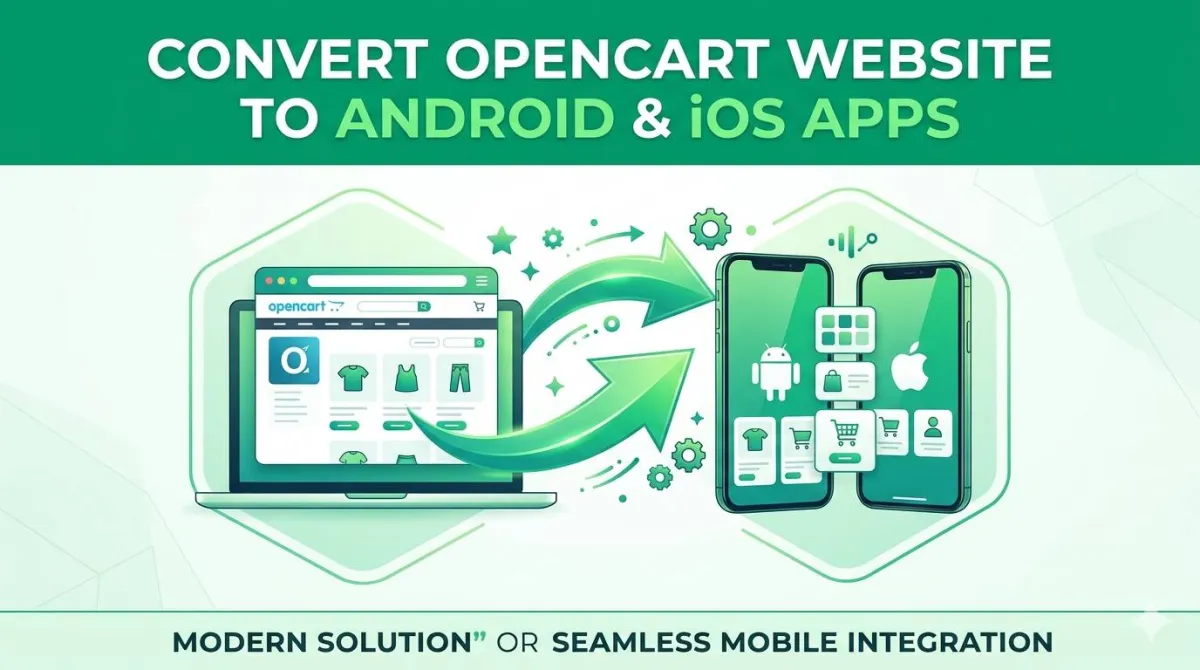
Converting an OpenCart store means wrapping the storefront you already run inside a native app shell — not rebuilding your catalogue somewhere else. Let's clear something up, because this trips a lot of OpenCart store owners up.
It's not rebuilding your store from scratch
When someone says "convert your OpenCart store to an Android and iOS app," they don't mean wiping out what you've built and starting over. That would be a nightmare — and expensive.
What it actually means is creating a native mobile app that connects to your existing OpenCart store through its API. Your products, categories, orders, and customer data all stay exactly where they are in your OpenCart admin panel. The app is essentially a better-looking, faster front-end that lives on your customer's phone.
Think of it like this: your OpenCart admin panel is the kitchen. The app is a brand new, beautiful dining room that customers actually sit in. The food (your products) is the same — it just arrives in a much nicer setting.
 ┌───────────────────────────┐
 │   OpenCart Admin Panel    │
 │ (Products, Orders, Users) │
 └─────────────┬─────────────┘
               │
         Live API Sync
               │
 ┌─────────────▼─────────────┐
 │       OpenCart API        │
 └─────────────┬─────────────┘
               │
      Native Performance
               │
 ┌─────────────▼─────────────┐
 │ Native iOS & Android App  │
 │  (Your Customers' Phones) │
 └───────────────────────────┘
What changes — and what doesn't
| What Stays the Same | What Gets Better |
|---|---|
| Your OpenCart admin panel | Load speed on mobile |
| Your products and categories | Customer experience |
| Your pricing and inventory | Push notification capability |
| Your order management | Home screen presence |
| Your existing extensions (mostly) | Repeat purchase rate |
The Big Question: "Will My Custom Extensions Break?"
No, your custom extensions do not break when the conversion is done properly, because they keep running on your OpenCart store exactly as they do now. Right — let's tackle the elephant in the room, because this is the number one concern we hear from OpenCart store owners.
Short answer: No — not if the conversion is done properly.
Here's the longer version.
Your OpenCart store's extensions — whether that's a custom shipping calculator, a loyalty points system, a product configurator, or a multi-vendor setup — live in your OpenCart admin panel and backend. They do their thing server-side.
When you convert your OpenCart store to an app, the app communicates with your OpenCart store via the API. Your extensions keep running in the background, just like they do for your website. The app calls the store, the store processes the order (extensions and all), and the result comes back to the app.
Where you might run into issues
The honest caveat: extensions that rely heavily on custom front-end behaviour — JavaScript pop-ups, inline widgets, third-party iframes — might not automatically transfer. These are front-end features, and your app's front-end is brand new.
That doesn't mean those features disappear. It means they need to be rebuilt natively in the app. A good app builder will either:
- Rebuild the feature natively in the app
- Connect to the extension's API endpoints directly
- Tell you clearly what won't carry over before you commit
If an app service promises everything works perfectly with zero testing needed — be sceptical. The right answer is: "Most things work, and here's our process for checking the ones that need attention."
Questions to ask before you commit
- "How do you handle OpenCart extensions that have custom front-end logic?"
- "Can I test the app with my actual store before going live?"
- "Which of my extensions have you successfully supported before?"
A service that gives vague answers to those questions isn't ready to handle a real OpenCart store.
How the Conversion Process Works (Step by Step)
The conversion runs to six steps: connect the store, design the app, configure push notifications, test it, submit to both stores, then launch and promote. The process is simpler than most OpenCart store owners expect. Here's how it typically goes when you use a proper service to convert your OpenCart store to an Android and iOS app.
Step 1: Connect your OpenCart store
The app builder connects to your OpenCart store via its API. You'll usually provide your store URL and API credentials from your OpenCart admin panel. No code editing required. Your product catalogue, categories, images, and pricing are pulled in automatically. What you've already set up in OpenCart becomes the foundation of the app.
Step 2: Design and customise the app
This is where you make it yours. Choose your colours (ideally matching your store's branding), set up your navigation menu, configure featured products or banners for the home screen, and adjust the layout to how you want customers to move through the app. You don't need to be a designer. Most services handle the heavy lifting and give you options to adjust.
Step 3: Configure push notifications
This is one of the biggest wins of going native. Set up push notification campaigns for:
- Abandoned cart reminders — bring back customers who added products but didn't check out
- Flash sale alerts — drive urgency for limited-time offers
- Restock notifications — tell customers when a product they wanted is back
- Order status updates — reduce "where's my order?" messages to your support inbox
Push notifications from OpenCart-connected apps have consistently higher open rates than marketing emails.
Step 4: Test everything thoroughly
Before you publish to the App Store and Google Play, test the app against your live OpenCart store. Go through the entire customer journey:
- Browse products
- Filter and search
- Add to cart
- Apply coupon codes
- Go through checkout (including any custom shipping or payment extensions)
- Check order confirmation and status
If your OpenCart store has extensions that affect checkout, test those flows specifically.
Step 5: Submit to the App Store and Google Play
Both platforms have a review process. Apple's App Store typically takes 1–3 days. Google Play is usually faster. A good app service handles the submission on your behalf — you shouldn't need to create developer accounts or navigate the submission process yourself.
Step 6: Launch and promote
Once live, promote the app to your existing customers. Your OpenCart store's customer base already knows and trusts you — they're the easiest first install. A launch email to your list, a banner on your OpenCart store, and a push notification welcome offer can drive early installs quickly.
What to Look for in an OpenCart App Builder
The thing that separates a competent OpenCart app service from a generic one is whether it actually understands OpenCart rather than treating your store as any other URL. Not every "turn your store into an app" service actually understands OpenCart. Here's what separates the ones that do from the ones that don't.
Native app vs. wrapped website
This is crucial. Some services take your OpenCart store's website and wrap it inside a shell that looks like an app. It's technically an app — but it's just your website in a container. It'll behave like a website (slow loads, browser-like scroll behaviour, no true native experience) and customers can tell.
A real native app is built specifically for iOS and Android. It communicates with your OpenCart store via API, renders content using native UI components, and feels like a proper app because it is one.
Always ask: "Is this a native app or a web wrapper?"
OpenCart API integration — not a workaround
The app should connect to your OpenCart store's official API — not scrape your website or use workarounds that break when you update OpenCart or install a new extension.
A proper API connection means:
- Product updates in your OpenCart admin panel appear in the app automatically
- Orders placed through the app come straight into your OpenCart admin panel
- Inventory stays in sync across your store and the app
Ongoing support and OpenCart compatibility
OpenCart gets updated. Extensions get updated. Your app needs to keep working through those changes. Look for a service that offers ongoing support, not just a one-time build.
The Real Benefits of Going Native for Your OpenCart Store
The changes that matter are commercial rather than cosmetic: higher average order value and fewer abandoned carts, both driven by removing friction from the return visit. Let's talk about what actually changes when your OpenCart store has a proper app.
Higher average order value
App users tend to browse more and buy more. The smoother experience removes friction from the purchase process, and push notifications bring customers back at exactly the right moment — when a product they viewed goes on sale, for example.
Reduced cart abandonment
Cart abandonment is one of the biggest revenue leaks in any OpenCart store. An app gives you push notifications as a recovery tool. A well-timed "You left something behind" notification with a small discount code converts a surprising number of abandoned sessions.
A direct channel to your customers
With an app installed, you have a direct line to your customers that doesn't depend on them seeing your email or scrolling past your social media post. A push notification goes straight to their lock screen. That's a level of access no other channel gives you.
Repeat purchases without the search
Once your app is on a customer's home screen, they don't need to Google you, remember your URL, or scroll through their bookmarks. Your OpenCart store is one tap away. That convenience drives repeat purchases in a way that a mobile website simply can't match.
Competitive edge in your niche
Here's the reality: most small OpenCart stores don't have an app. If your competitors are still relying solely on their websites while you have a native app with push notifications and a smoother checkout, you've given yourself a meaningful advantage.
How Much Does It Cost to Convert an OpenCart Store to an App?
Costs run from a monthly app-builder subscription at the low end to a five-figure custom agency build at the high end, and the right choice depends on whether you need bespoke functionality or simply your existing store on a phone. Costs vary significantly depending on the approach.
| Approach | Typical Cost | What You Get |
|---|---|---|
| Custom agency build | £15,000–£50,000+ | Fully bespoke, but overkill for most stores |
| App builder platforms | £30–£150/month | No-code or low-code, usually templates |
| OpenCart-specific services | Varies | Built for OpenCart, proper API integration |
Typical Custom Agency Build
£15,000AppOfWeb API Integration
Fraction of CostFor most OpenCart store owners, a platform that specialises in OpenCart app conversion offers the best balance — proper native functionality, OpenCart API integration, and a price that makes sense for a real small business.
AppOfWeb builds native Android and iOS apps directly from OpenCart stores, with proper API integration, push notifications, and support for the kind of custom extensions that real OpenCart stores actually use. Worth a look if you want to convert your OpenCart store to an app without the headaches.
Common Mistakes to Avoid
The costliest OpenCart app mistakes come from rushing the decision, not from the technology. These are the ones OpenCart store owners run into when they rush the decision.
Choosing the cheapest option without checking the output
A rock-bottom price almost always means a web wrapper, not a native app. Ask to see examples of apps they've built for other OpenCart stores. Install one and use it. If it feels like a website, it is one.
Not testing with your actual extensions
Don't assume your extensions will work fine and find out at launch that your custom shipping calculator doesn't function. Test the full customer journey before going live.
Skipping the App Store guidelines review
Both Apple and Google have strict rules about what apps can and can't do. A good service will guide you through this, but it's worth knowing that apps with too-aggressive push notifications, certain types of affiliate content, or specific product categories face stricter review. Understand what applies to your OpenCart store before you submit.
Treating the app as a set-and-forget tool
An app is a channel, not a one-time project. Plan to use push notifications regularly, update your featured products and banners, and actively promote the app to your customer base. An unused app doesn't drive sales.
Frequently Asked Questions
Ready to Get Your OpenCart Store on the App Store?
If you've been putting this off because it felt complicated or expensive, hopefully this has made it a bit clearer. The core process — connect your OpenCart store, customise the app, test with your extensions, publish — is more straightforward than most store owners expect.
The main thing is choosing a service that actually knows OpenCart. Not a generic "any store" platform that treats your OpenCart admin panel like an afterthought, but one that's built its process around how OpenCart actually works.
AppOfWeb specialises in converting OpenCart stores to native Android and iOS apps. If you want to convert your OpenCart store to an Android and iOS app without the technical headache, that's a good place to start.