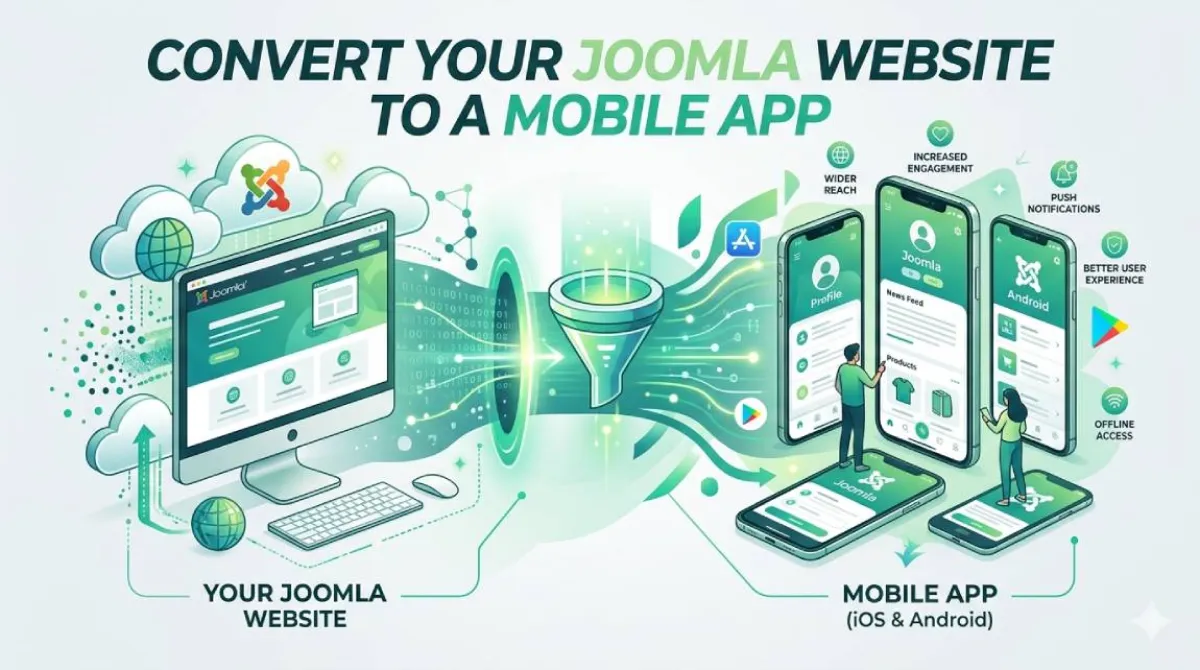
Convert Your Joomla Website to an Android and iOS App — Without Touching a Single Component
Your Joomla site works. Articles are structured, components are layered in, modules are doing their thing. The back end is solid. You know where everything is in Joomla admin, and after years of maintaining it, so does your muscle memory.
But here's the bit nobody really wants to say out loud: your Joomla site probably has a mobile problem. And a responsive template isn't fixing it the way you hoped.
This post covers exactly how to convert your Joomla website to an Android and iOS app — without installing a single component, touching your Joomla admin, or handing anyone your credentials.
Here's the thing: there's a real gap between "website that works on mobile" and "app that lives on someone's phone." The good news? You can close that gap today — without writing a single line of code or paying a developer thousands of dollars.
This guide walks you through exactly how AppOfWeb converts your Joomla site into a real mobile app using AppOfWeb — including every feature you get, how the process actually works, and how to go live when you're ready.
Your Joomla Site Is Solid. Your Mobile Presence Has a Gap.
Think about the last time you opened a Joomla site on your phone. Not a client's site — yours, or one you've built. Really opened it, tapped around, tried to read an article, maybe hit a component page.
It loaded. Eventually. The layout probably held together at 375px. But "it works on mobile" and "it feels like a proper mobile experience" are two very different things.
The Real Gap"It works on mobile" and "it feels like a proper mobile experience" are two very different things.
Visitors who land on your Joomla site from a phone aren't comparing it to your desktop version. They're comparing it to every other app they've used that day — apps with smooth navigation, instant loading, and a home screen icon they tapped without thinking. That's the gap.
And while your Joomla site has been doing exactly what Joomla does well, the sites competing for the same audience have been getting native apps built for them. That's worth paying attention to — especially if you're a freelancer or agency who's supposed to be the one recommending what comes next.
Why Joomla's Architecture Works Against Mobile Browsers
Joomla's component-and-module stack is one of the best things about building with it. It's also the reason mobile visitors have a rough time.
The Component Stack Problem
If you've got K2 managing your articles, JomSocial handling your community features, and a handful of third-party extensions doing everything else — each of those adds page weight. And mobile browsers have to parse all of it before anything renders on screen.
On a desktop with a fast connection, nobody notices. On a phone on 4G, users notice immediately. They just don't wait around to tell you about it — they leave.
MOBILE BROWSER RENDERING A JOOMLA PAGE
───────────────────────────────────────

 Request ──▶ Joomla Core
                 │
                 ▼
            K2 Component
                 │
                 ▼
         JomSocial Component
                 │
                 ▼
       Third-Party Extensions
                 │
                 ▼
        Template + Modules
                 │
                 ▼
       ░░░ First Pixel Renders ░░░
Every layer has to be parsed before the page appears — on a fast connection, nobody notices the order. On mobile data, every layer adds wait time.
Module-Heavy Sidebars on Small Screens
Your Joomla template might look impeccable at 1280px. Module positions carefully arranged, sidebars pulling their weight, the layout breathing exactly right.
At 375px, those same module positions stack. What was a clean two-column layout becomes a scroll through four stacked blocks before the user gets to the article they actually wanted. Template frameworks designed for desktop weren't built to handle narrow viewports gracefully — they were built to handle them adequately.
Why a Responsive Template Isn't Enough
This is the one Joomla developers hear a lot: "But our template is responsive." It is. That's not the same as being fast, or native, or good on mobile.
A responsive template reflows your layout. It doesn't reduce how much JavaScript your Joomla component stack is loading. It doesn't give users offline access. It doesn't eliminate the render-blocking scripts that fire before a single pixel appears on screen.
The problem isn't how your Joomla pages are arranged at small sizes. The problem is what a mobile browser has to do to render a full Joomla page in the first place.
Why a Native App Is the Right Next Layer for a Joomla Site
Here's a framing that will make sense to anyone who's spent time in Joomla: you already know how to extend a site.
You install a component when you need functionality your core Joomla install doesn't cover. You add a plugin when you need a behaviour change. You drop in a module when you need something to appear in a specific position. That's the Joomla way of thinking — build on what's already there.
A native app is the same logic applied to mobile reach. It's not a replacement for your Joomla site. It's another layer on top of it — one that extends where your site can go.
You Already Extend Your Site — This Is the Same Idea
Adding a Joomla component extends what your site can do. A native app extends where your site can go.
- Onto the home screen — not a bookmark buried in a browser, an icon that lives where your users spend most of their time
- Into push notification inboxes — you publish an article, users find out immediately without needing to check your site
- Into offline availability — users get a clean, branded experience even when their signal drops
None of that is possible with a responsive Joomla template. All of it is possible with an app built on top of your existing Joomla site.
Competing Sites Are Getting Apps. Yours Isn't Yet.
Other freelancers and agencies are already offering native app delivery as a standard part of their client packages. Clients who've worked with those agencies now have an app on the App Store. The clients who haven't are asking why they don't.
If you're a Joomla developer or agency owner, this is a gap in your service offering that's getting harder to ignore. The good news is it's a gap you can close without a mobile development team or a six-month build.
App Store Presence vs. a Browser Bookmark
There's a real difference between a URL someone can visit and an app someone can install.
An app on the iOS App Store or Google Play is searchable. It's installable. It lives on the device. It sends notifications. It doesn't require the user to remember your domain, open a browser, and type it in.
A bookmark in a mobile browser requires a user who cares enough to save it. An app requires a user who installs it once — after that, your icon is there every time they unlock their phone.
How AppOfWeb Converts Your Joomla Site — No Admin Changes, No Components to Install
The question every Joomla site owner asks first: "What do you need from my Joomla admin?"
The answer is: nothing.
AppOfWeb builds your app from your Joomla site's URL. It reads your site exactly as a browser would, wraps it into a native app, and leaves your Joomla configuration exactly as it is. No component to install. No plugin to activate. No template changes to coordinate. No Joomla admin access handed over to anyone.
URL In, App Out
The process starts with your Joomla site's URL. That's it. You submit it to AppOfWeb, specify your preferences — app name, icon, colours, tab structure — and AppOfWeb builds the app around what's already there.
Your Joomla admin isn't touched. Your articles, your component structure, your module positions — none of it changes.
Nothing Changes on Your Joomla Install
This is worth being explicit about, because it's the opposite of how most Joomla extensions work.
When you install a Joomla component, it adds rows to your database, files to your server, and an entry to your component list. When AppOfWeb builds your app, none of that happens. AppOfWeb operates entirely outside your Joomla install. It reads your site's front end as a visitor would. Your database, your server files, your Joomla admin — untouched.
Compatible With Any Joomla Version
Joomla 3.x? Still running. Joomla 4.x? Fine. Joomla 5.x? Also fine.
AppOfWeb doesn't care which version of Joomla your site is running because it never talks to Joomla directly. It reads what your site serves to browsers. As long as your Joomla site loads in a browser, AppOfWeb can build an app from it.
More on this in the objections section — because "Joomla is old, will this actually work?" deserves a proper answer.
Every AppOfWeb Feature — And Why It Matters for Joomla Sites Specifically
Here's a full breakdown of what's included when you use AppOfWeb to convert your Joomla website to an Android and iOS app.
Core Features
| Feature | What It Does | Why It Matters for Joomla |
|---|---|---|
| App Icon & Splash Screen | Sets your app's visual identity on install | Keeps your app consistent with the branding already applied across your Joomla template |
| Customizable Bottom Tabs | Persistent nav bar linking to your key site sections | Surfaces your article categories and component pages directly — no relying on Joomla's top menu |
| Share App | Built-in button for users to send the app to others | Turns your Joomla community site users into passive distribution |
| Rate App | Prompts App Store / Google Play reviews at the right moment | Builds your store rating passively — affects discoverability over time |
| Pull To Refresh | Downward swipe to reload content | Essential for Joomla sites that publish regular articles or frequently updated component data |
| Status Bar Customization | Controls the colour of the device's top status bar | Match it to your Joomla template's colour scheme so the app feels native, not wrapped |
| Page Loader | Branded loading indicator while Joomla content renders | Prevents users from assuming the app has frozen on component-heavy pages |
| Pinch To Zoom | Standard pinch-to-zoom on content | Useful for Joomla sites with data tables, detailed article layouts, or image-heavy components |
| No Internet Screen | Custom branded offline screen | Replaces default browser errors — keeps the experience under your control when connectivity drops |
| App Syncing With Site | App reflects your live Joomla site in real time | Publish a Joomla article, it appears in the app — no separate publishing step, no sync button to push |
| Customize Package Name | Sets com.yoursite.app as the app's unique identifier |
Each client's app is on-brand — not generic — important for agencies delivering apps to multiple clients |
| Unlimited Revisions | Request changes to config, tabs, and branding without extra cost | If your Joomla site restructures its article categories or navigation, the app updates to match |
Zero Components Installed
AppOfWeb builds entirely from your site's URL — nothing is added to your Joomla install.
Works on Every Joomla Version
3.x, 4.x, or 5.x — if it loads in a browser, AppOfWeb can build an app from it.
Real-Time Content Sync
Publish in Joomla admin and it reflects in the app — no second publishing step.
Unlimited Revisions
Reconfigure tabs, branding, or structure any time without starting over.
A Note on the Two Standout Features
Customizable Bottom Tabs deserves a mention for anyone who's worked with Joomla's menu system. Your Joomla site probably has a main menu, a top menu, and a few module positions that surface navigation in various ways. None of that maps cleanly to a mobile app's navigation.
Bottom tabs let you define exactly which sections of your Joomla site get top-level placement in the app — article categories, community component pages, contact forms, whatever matters most to your users. It's not pulling from your Joomla menu structure. You decide what's prominent.
App Syncing is the one Joomla site owners tend to underestimate until they think about it properly. Your entire content workflow — everything you do through Joomla admin, every article you publish, every component you update — flows directly into the app. There's no secondary CMS, no separate dashboard to log into, no "push to app" button. Your Joomla admin stays your Joomla admin. The app just reflects it.
Addon Features
These aren't included by default but are worth knowing about:
Push Notifications Addon
Send targeted notifications directly from AppOfWeb's dashboard to everyone who has your app installed. No Joomla plugin required on your end. No third-party notification service to set up.
For Joomla sites that publish time-sensitive content — news articles, events, community announcements — this is the highest-impact mobile engagement tool available. When you publish, your users find out immediately. Not when they happen to visit your site. Immediately.
Publishing to Stores Addon
AppOfWeb handles the full submission process to the Apple App Store and Google Play — technical requirements, metadata, screenshots, the works.
If you've ever tried to navigate Apple's App Store Connect or Google Play Console for a client, you know how much friction is involved. Developer accounts, provisioning profiles, review guideline compliance. AppOfWeb takes all of that off your plate. You deliver a live, published app to your client without needing your own Apple developer account or Play Console setup.
From Joomla URL to Live App — What the Process Actually Looks Like
This isn't a development engagement. There's no sprint planning, no back-and-forth about API credentials, no waiting for a developer to get access to your Joomla admin. The process is genuinely straightforward.
Step 1 — Submit Your Joomla Site URL
Go to AppOfWeb, enter your Joomla site's URL, and specify what you want: app name, icon, colours, which sections to surface in the bottom tabs.
No login to your Joomla admin. No credentials shared. Just your URL and your preferences.
Step 2 — AppOfWeb Builds the App
The AppOfWeb team configures the app around your site. You're not reviewing code or coordinating a development timeline. You're waiting for a finished app to review.
For most Joomla site configurations, this step doesn't require any input from you at all.
Step 3 — Review and Request Revisions
You receive the app for review. If anything needs adjusting — a tab label, a colour, a navigation change — you request the revision. Revisions are unlimited. There's no "two rounds of amends" cap that every agency knows causes problems.
Step 4 — Store Submission (Optional Addon)
If you've included the Publishing addon, AppOfWeb handles everything from here. Apple App Store and Google Play submission, technical compliance, metadata. Your role is approving the final submission — that's it.
Estimated traditional dev cost
$10,000Joomla components touched by AppOfWeb
0Estimates only — actual freelance/agency development costs vary widely by scope and region. The "0 components touched" figure reflects that AppOfWeb builds from your site's URL without installing anything in your Joomla admin.
Real Objections, Answered Directly
These are the actual questions Joomla site owners ask before committing to an app. No paraphrasing — these come up every time.
"Joomla is old — is AppOfWeb actually going to work with it?"
Yes. And this is worth explaining properly because it's the most common hesitation from Joomla users.
AppOfWeb doesn't connect to Joomla's database. It doesn't call Joomla's API. It doesn't install anything in your Joomla admin or care which version you're running.
It reads your site's front end exactly as a browser does. Whatever your Joomla site serves to visitors — whether it's running on Joomla 3.10 with a Protostar template, or Joomla 5.x with a custom Helix framework theme — AppOfWeb reads that output and builds the app around it.
Joomla's age is not a variable in this process. If your site loads in a browser, AppOfWeb can build an app from it.
"Will my Joomla articles and components display properly inside the app?"
Yes. The app renders your Joomla site's front end as-is.
The same article layout your visitors see in a browser appears inside the app. The same component pages, the same module-driven sections, the same K2 category listings — all of it. AppOfWeb doesn't reformat your content or pull it out of Joomla into a separate system.
What's in Joomla admin stays in Joomla admin. The app just shows it.
"I already have a mobile-responsive Joomla template — why would I need an app?"
Because a responsive template and a native app solve different problems.
Your responsive template adjusts how your Joomla pages are laid out at small screen sizes. It doesn't reduce the number of HTTP requests your component stack fires. It doesn't let you send push notifications. It doesn't put an icon on anyone's home screen. It doesn't appear in the App Store.
A native app puts you on the home screen, gives you a push notification channel, gets you App Store visibility, and gives users a faster, smoother experience on mobile hardware than any browser-rendered Joomla page can.
These aren't alternatives. They coexist. Your responsive template handles visitors who come via browser. Your app handles the users who install it and come back through their home screen.
| Capability | Responsive Joomla Template | Native App (AppOfWeb) |
|---|---|---|
| Home screen icon | No | Yes |
| Push notifications | No | Yes (Addon) |
| Custom branded offline screen | No | Yes |
| App Store / Google Play listing | No | Yes (Addon) |
| Reduces component/script load | No — only reflows layout | No — renders the same front end, adds a native shell on top |
| Requires Joomla admin changes | No | No |
"I don't have time to manage another platform on top of Joomla admin."
There's no other platform to manage.
When you publish an article in Joomla admin, it appears in the app. When you update a component, the app reflects it. When you change a module, users see it next time they open the app.
Your entire content and site management workflow stays in Joomla admin, where it already is. AppOfWeb stays in the background, syncing your live site to the app. No dashboard to log into. No sync button to remember. No second workflow to build.
Frequently Asked Questions
Yes. The app displays your Joomla site's front end directly — article layouts, custom fields, category structures — exactly as they appear in a browser. No content reformatting, no migration.
No. AppOfWeb works entirely from your site's URL. Nothing is installed in your Joomla admin and no entries are added to your component list.
Yes. The app syncs with your live Joomla site. Publish a new article in Joomla admin, and that content is in the app the next time a user opens it. There's no separate publishing step.
Modules that appear on your site's front end will appear in the app, since the app renders your live site. If certain module positions don't translate well to the mobile layout, AppOfWeb's customizable bottom tabs let you control which sections of your site are surfaced prominently in the app's navigation — so you're not locked into whatever your module layout produces.
Build time varies by configuration complexity and whether you've included the Publishing addon, but the process doesn't require any work on your Joomla install — which removes the longest variable in most app projects. AppOfWeb handles build and submission. You review and approve.
Yes, and this is a real upsell opportunity. The Customize Package Name feature means each client's app has their own identifier — not a generic one. The Publishing addon means AppOfWeb handles App Store and Google Play submission on your behalf. You deliver a live, published app to your client without managing a developer account or navigating App Store Connect yourself.
Request a revision through AppOfWeb. Revisions are unlimited. If you reorganize article categories, add new components, or rework your module layout — you can update the app's configuration to match without starting the build over.
Conclusion
Joomla has done its job. The site works, the component stack is stable, the articles are structured, and you know your way around Joomla admin without thinking about it. That's a good position to be in.
The gap is mobile — not because your Joomla site is broken on phones, but because a browser-rendered Joomla page and a native app are doing fundamentally different things for your audience. One is a site they can visit. The other is an app they install, return to through their home screen, and hear from through push notifications.
AppOfWeb bridges that gap without asking anything of your Joomla install. No components. No plugins. No admin access. Just your URL, your preferences, and a live app on Android and iOS at the other end.
Three things to take away:
- Joomla's component and module architecture is not a barrier to having a native app. AppOfWeb reads your site's front end — it doesn't touch the Joomla install at all. Every version from 3.x to 5.x works.
- A responsive Joomla template and a native app solve different problems. The template reflows your layout. The app puts you on the home screen with push notification access, App Store visibility, and a faster mobile experience.
- Your workflow doesn't change. You stay in Joomla admin. The app syncs with your live site automatically. No new platform to manage, no secondary publishing step.
If you're a freelancer or agency who builds and maintains Joomla sites, this is the mobile deliverable your clients are going to start asking for — if they haven't already.