Convert Your Shopify Store to Mobile App with Appofweb
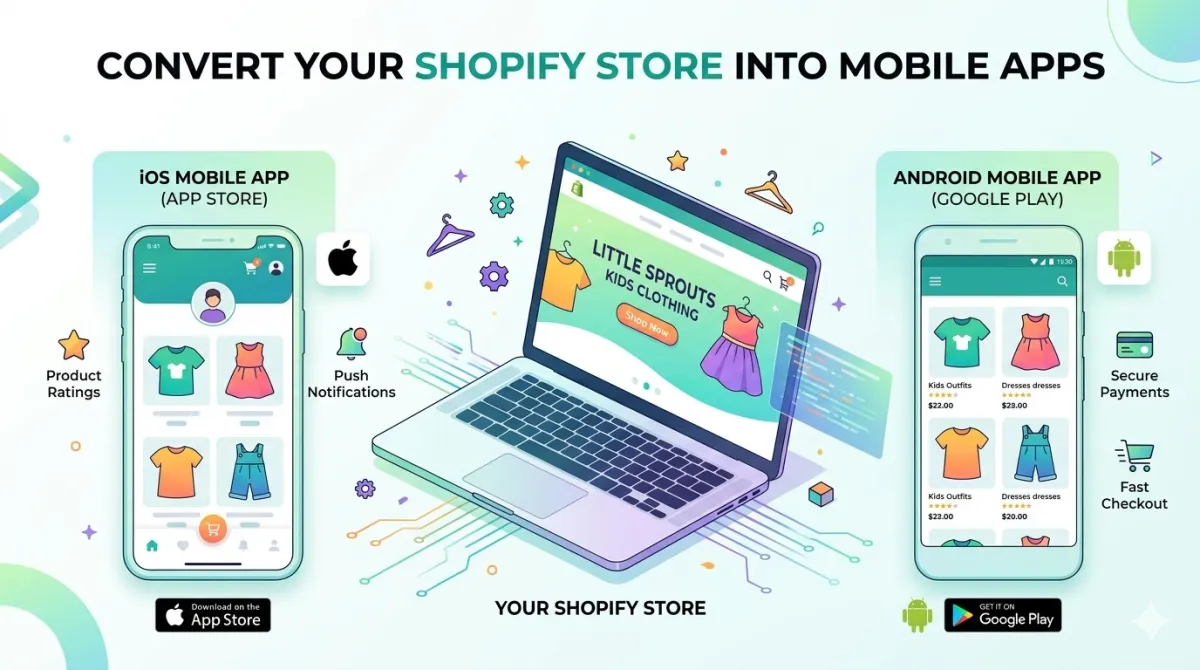
Want to convert your Shopify store to a mobile app for Android and iOS? This guide covers everything — why you need one, how it works, and the easiest way to get it done without touching a single line of code.
⏱️ TL;DR — Short on time?
- Most online shoppers are on their phones. A mobile app converts way better than a mobile browser.
- You have 3 options to build a Shopify app: custom dev (slow + expensive), DIY builders (more work than advertised), or a done-for-you service.
- Appofweb converts your existing Shopify store into a real Android + iOS app — you hand over your URL, our team does the rest.
- We offer a free demo build so you can see your app before committing to anything.
- See all plans here →
Table of Contents
- Your Shopify Store Is Quietly Losing Sales
- Why Mobile Apps Actually Matter for E-Commerce
- Your 3 Options for Building a Shopify App
- What Is Appofweb and How Does It Work?
- The Step-by-Step Conversion Process
- Preparing Your Store Before the Switch
- How to Get Your First App Downloads
- Common Mistakes to Avoid
- Pro Tips for Long-Term App Success
- FAQs
- Conclusion + Next Steps
Your Shopify Store Is Quietly Losing Sales
Here's a question worth thinking about: where are your customers right now?
Odds are, they're on their phones. Scrolling. Shopping. Clicking around. And if your Shopify store doesn't have a mobile app, you're basically asking them to eat soup with a fork — technically doable, but way more effort than it needs to be.
Mobile browsers are frustrating. Pages load slowly, users have to type in their passwords (again), and there's no way to reach them after they leave your site. Meanwhile, stores with mobile apps are sending push notifications, recovering abandoned carts, and building the kind of loyalty that keeps customers coming back.
This guide covers everything you need to know about converting your Shopify store into a real mobile app — what it takes, what your options are, and how to do it without hiring a single developer or writing a single line of code. By the end, you'll know exactly what to do next.
Let's get into it.
Why Mobile Apps Actually Matter for E-Commerce
The Mobile Shopping Shift Is Already Here
This isn't a "coming soon" trend. It's already happening.
According to Statista, mobile devices now account for well over 70% of global e-commerce traffic. And that number keeps climbing every year.
But here's the thing — traffic is one thing. Sales are another.
Mobile browsers actually convert at a much lower rate than desktop, partly because the experience is clunkier. Apps fix that problem. Studies consistently show that mobile apps convert shoppers at 3x the rate of mobile websites (Criteo, 2023).
So yes — mobile matters. But a mobile app matters even more than a mobile-friendly website.
Check 20 proven benefits of a mobile app for a business in 2026.
What App Users Get That Browser Shoppers Don't
Think about your own experience using a good shopping app vs. a mobile website. The app just feels better. Here's why:
| Feature | Mobile Browser | Mobile App |
|---|---|---|
| Login experience | Type password every time | One tap, stay logged in |
| Speed | Depends on internet connection | Faster — content is cached |
| Push notifications | ❌ Not possible | ✅ Yes — sales, restocks, cart reminders |
| Offline browsing | ❌ No | ✅ Limited offline access |
| Full-screen experience | ❌ Browser UI always visible | ✅ Clean, immersive, branded |
| Home screen presence | ❌ Bookmark (if they remember) | ✅ App icon on their phone |
The Numbers That Should Make You Pay Attention
- Push notifications have an open rate of around 20–30% compared to email's 2–5%. That's not a small difference — that's a game-changer for promotions and abandoned cart recovery.
- App users tend to spend more per session and return more frequently than mobile web users.
- Cart abandonment rates on mobile browsers sit around 85%. In apps, that number drops significantly because checkout is smoother and faster.
💡 Quick tip: Having a mobile-responsive Shopify theme is great — but it's not the same as having a mobile app. Responsiveness just means your website scales down to fit a small screen. An app is a completely different (and much better) experience.
Your 3 Options for Building a Shopify App
Okay, so you're convinced you need an app. Now what? You've got three main roads to go down:
Option 1 — Build a Custom Native App from Scratch
This is the "hire a development team and build it from the ground up" route.
What it involves:
- Hiring iOS and Android developers (separately, usually)
- A project manager, a designer, a QA tester
- App Store submission and compliance reviews
- Ongoing updates every time Apple or Google releases a new OS version
Typical outcome:
- ⏱️ Timeline: 6–18 months
- 💰 Cost: Tens of thousands of dollars minimum
- 🔧 Maintenance: Constant and expensive
Best for: Large brands with dedicated tech teams and deep pockets.
Not great for: Pretty much any Shopify store owner who doesn't run a Fortune 500 company.
Option 2 — DIY No-Code App Builders
These are platforms that let you "build your own app" through drag-and-drop dashboards. Sounds easy, right?
The reality:
- You still have to design the app, configure everything, set up integrations, and test it
- If something breaks (and it often does after a Shopify update), you're on your own
- App Store rejections are surprisingly common for first-timers
- Learning the platform itself can take days or weeks
⚠️ Heads up: "No-code" doesn't mean "no work." If you're not technical, these platforms can turn into a frustrating, time-consuming project really fast.
Best for: People who have time, enjoy tinkering, and don't mind a learning curve.
Not great for: Busy store owners who'd rather focus on running their business.
Option 3 — Done-For-You Conversion Services
This is the middle ground — and honestly, it's the sweet spot for most Shopify sellers.
You hand over your store URL. A team of experts builds, tests, and publishes your app for you. You don't touch a line of code. You don't learn anything new. You just... get an app.
This is exactly what we do at Appofweb — and the rest of this guide is focused on how it all works.
Side-by-Side Comparison
| Custom Dev | DIY Builder | Appofweb | |
|---|---|---|---|
| Cost | Very high | Low–Medium | Affordable |
| Time to launch | 6–18 months | Weeks–months | Days–weeks |
| Technical skill needed | High (team required) | Medium | None |
| Design work required | Yes | Yes | No |
| App Store submission handled | Your team | You | Our team |
| Maintenance included | Your team | You | Optional add-on |
| Your effort level | Very high | High | Very low |
What Is Appofweb and How Does It Work?
The Simple Version
Appofweb takes your existing Shopify store and wraps it inside a real, native-feeling mobile app — for both Android and iOS. Your customers download it from the App Store or Google Play, tap on your icon, and shop just like they would on any major retail app.
You don't rebuild anything. You don't migrate anything. Your store stays exactly as it is.
What's a Webview App? (And Is It Actually "Real"?)
Fair question. You might be wondering: is this really an app or just my website in disguise?
Here's the honest answer: it's a webview-based app.
Think of a webview like a browser window built into a native app shell. Your store loads inside it — but without any of the browser chrome (address bar, tabs, navigation buttons). The user gets a full-screen, branded experience. It looks and feels like a proper app.
What makes this approach really smart for Shopify stores:
- ✅ Your store's mobile design already works — it just goes inside the app
- ✅ Any update you make in Shopify (new product, price change, sale banner) shows up in the app automatically — no app update needed
- ✅ All your existing checkout, payment methods, and discount codes work as-is
- ✅ One version of your store, running everywhere
💡 Real talk: Big brands like Amazon and Airbnb use webview for parts of their apps too. It's a legitimate, widely-used approach — not a shortcut.
What Our Team Handles
You give us your store URL. From there, our team takes care of:
| Task | Who Does It |
|---|---|
| App development & setup | Our team |
| Branding (icon, splash screen, colors) | Our team |
| Testing on real devices | Our team |
| App Store & Play Store submission | Our team (available as add-on) |
| Publishing your app | Our team (available as add-on) |
| Ongoing maintenance & updates | Our team (available as add-on) |
Everything from the pricing page makes it clear what's included in each plan.
Key Features You Get
- 🔔 Push notifications — for sales, restocks, order updates, cart recovery
- 🎨 Fully branded — your logo, your icon, your splash screen
- 🔗 Deep linking — send users directly to specific products from outside the app
- 🛒 Full checkout support — Shopify Payments, PayPal, and your other gateways all work
- 📱 Android + iOS — one service, both platforms
The Step-by-Step Conversion Process
Step 1 — You Share Your Store URL
That's genuinely the starting point. Share your live Shopify store URL with us, along with your preferred app name, logo, and any branding notes. Our team takes it from there.
(Make sure your store is live and not password-protected — we need to access it to get started.)
Step 2 — We Handle Branding & App Setup
Our team sets up:
- Your app icon (that little square on your customer's home screen)
- A branded splash/loading screen
- Your app name and any accent colors
- Navigation and layout configuration
You don't need to supply design files if you don't have them — we work with what you've got.
Step 3 — Get Your Free Demo Build First
Before anything is finalized, we build a free demo version of your app so you can actually see what it looks like and how it feels. You can tap through it, test the checkout, browse products — the whole thing.
This is a zero-commitment step. If you love it (most people do), you move forward. If you want changes, we make them. No pressure.
🎯 This is worth highlighting: most services ask you to commit before you see anything. We flip that. See your app first, then decide.
Step 4 — Internal Testing
Once you're happy with the demo, our team runs it through proper QA — testing on real Android and iOS devices, across different screen sizes, on different connection speeds. We specifically check:
- Full checkout flow (start to finish)
- Payment gateway functionality
- Product browsing and search
- Push notification delivery
- Load speed and scroll behavior
Step 5 — App Store & Play Store Submission
Submitting an app to Apple or Google is… not as simple as it sounds. Both platforms have review processes, specific requirements, and policies that change regularly. Getting rejected because of a missing privacy policy page or a metadata issue is more common than you'd think.
Our team handles the submission process on your behalf. This is available as part of our publishing service — check the pricing page for details on what's included.
Typical review timelines:
- Google Play: A few hours to a couple of days
- Apple App Store: Usually 1–3 business days
Step 6 — You Go Live
Once approved, your app is live on both stores. You'll get your App Store and Google Play listing links to share with customers, put in your email footer, add to your website, etc.
And if you opt into our maintenance service, our team keeps the app healthy over time — updating it when iOS or Android releases new versions, handling policy changes, and making sure everything stays working as Shopify evolves.
Preparing Your Store Before the Switch
You don't need to do much — but a little prep goes a long way.
✅ Pre-Launch Checklist
Mobile experience:
- [ ] Test your Shopify store on a real phone — does it feel smooth?
- [ ] Check that images load quickly (compress them if needed)
- [ ] Simplify your navigation menu if it's deep or complex
- [ ] Run through checkout end-to-end on mobile
Branding assets to have ready:
- [ ] High-res logo (at least 1024x1024 px)
- [ ] Your brand hex color codes (or just describe your colors)
- [ ] Preferred app name (check if it's available on App Store and Play Store)
Legal pages (required by Apple and Google):
- [ ] Privacy Policy page — this is non-negotiable for both stores
- [ ] Terms of Service page — strongly recommended
⚠️ Don't skip the Privacy Policy. It's the #1 reason first-time app submissions get rejected. Shopify has a built-in Privacy Policy generator — use it as a starting point, but make sure it covers your app's data practices too.
Push notification plan:
- [ ] Decide what kinds of notifications you'll send (promos, order updates, restock alerts)
- [ ] Draft your welcome notification for new installs
- [ ] Plan your first 30 days of notification campaigns
How to Get Your First App Downloads
Tell Your Existing Customers First
They already like you. Start there.
- Email your list with a launch announcement and direct download links
- Add a download banner to your Shopify homepage
- Pin an announcement on all your social media channels
- Try an app-exclusive promo: "Get 15% off your next order — app only." This gives people a reason to download it right now instead of bookmarking the idea.
Use Push Notifications Smartly from Day One
This is honestly the biggest superpower of having an app. But it only works if you use it well.
High-performing notification types:
- Welcome message for new installs ("Thanks for downloading! Here's 10% off your first order in the app")
- Flash sale countdowns ("⏰ 4 hours left — 30% off everything")
- Back-in-stock alerts for popular products
- Abandoned cart nudges ("Still thinking it over? Your cart's waiting.")
Start with 1–2 notifications per week max. You can increase frequency once you know your audience is engaged.
App Store Optimization (ASO) — Getting Found Organically
ASO is basically SEO for app stores. A few things that matter:
- App name and subtitle — include your main keywords naturally
- Description — clear, benefit-focused, written for real people (not robots)
- Screenshots — show the experience, not just screens. Show products being browsed, checkout being completed
- Ratings — ask happy customers to leave a review (a post-purchase push notification works great for this)
Promote the App Across Your Whole Marketing System
- Add "Download our app" to every email footer with QR codes
- Create a simple landing page on your Shopify site for the app download
- Mention the app in your packaging and thank-you cards
- Share short screen recordings of the app on Instagram and TikTok
Common Mistakes to Avoid
❌ Mistake 1: Skipping the Demo Stage
The demo build is free. Use it. Don't assume everything will look perfect — test the checkout, browse around, try it on different phones if you can. Catching an issue during demo is painless. Catching it after launch is not.
❌ Mistake 2: Ignoring Your App Store Listing
Your app listing is basically a landing page. A blurry icon and a two-sentence description will kill your install rate before anyone even downloads it.
Put real effort into:
- A clean, professional icon
- At least 4–5 high-quality screenshots
- A description that explains what your store sells and why someone should download the app
❌ Mistake 3: Launching and Going Quiet
You just built something cool. Tell people about it! Don't assume downloads will come organically right away. Plan your launch week promotions, announcements, and social posts before the app goes live.
❌ Mistake 4: Overusing Push Notifications
Push notifications are powerful — which means they can also be really annoying if you overdo it. More than 3–4 notifications per week is usually where people start turning them off.
Keep them relevant, timely, and worth opening. Quality beats quantity every time.
❌ Mistake 5: Skipping Maintenance
Apps need upkeep. Apple and Google update their platforms regularly, and apps that aren't maintained eventually stop working properly — or get removed from the store entirely.
If you're not planning to handle updates yourself, the maintenance add-on is worth it. It's much cheaper than dealing with a broken app after an iOS update.
❌ Mistake 6: Launching Without a Privacy Policy
Both Apple and Google require a Privacy Policy URL when you submit an app. No exceptions. If you don't have one, your submission gets rejected before anyone even reviews the app itself.
Shopify's built-in generator is a good starting point — just make sure it covers your app as well.
Pro Tips for Long-Term App Success
Keep Your Shopify Store Fast and Clean
Because the app wraps your live store, your store's performance directly affects your app's performance. If your website is slow, your app will be slow.
A few quick wins:
- Compress large product images (use tools like TinyPNG or Shopify's built-in optimization)
- Avoid excessive pop-ups inside the store — they're already annoying on mobile web, and they're worse inside an app
- Make sure your checkout has as few steps as possible
Use Personalization in Push Notifications
Generic notifications get ignored. Specific ones get opened.
Compare:
- ❌ "Check out our new arrivals!"
- ✅ "Hey Sarah — the jacket you viewed last week is back in stock 🎉"
Even simple first-name personalization can noticeably improve open rates.
Respond to App Store Reviews
Every review — good or bad — is an opportunity. Thank people who leave positive ones. Address negative ones calmly and professionally. Potential customers read reviews before downloading. Seeing that you actually respond and care goes a long way.
Treat Your App Users Like VIPs
Create a two-tier system: app users get better deals. This doesn't have to be huge — an extra 5% off, early access to sales, exclusive bundles. The goal is to make customers glad they downloaded your app, so they keep it installed and keep coming back.
Measure What's Working
Track your app's performance separately from your website:
- How many installs per week/month?
- What's the conversion rate inside the app?
- Which push notifications get the most opens?
- What's the average order value from app users vs. browser users?
These numbers help you double down on what's working and stop doing what isn't.
FAQs
Do I need to know how to code?
Not even a little. You literally just share your Shopify store URL. Our team handles everything from there — development, design, testing, and publishing. No technical knowledge required.
Is a webview app a "real" app?
Yes — it's a real app that users download from the App Store or Google Play. It has your branding, lives on their home screen, sends push notifications, and works like any other shopping app. The webview approach just means your store runs inside a native shell, which is actually a smart and widely-used method.
Will my existing payment methods and discount codes still work?
Yes. Since the app wraps your live Shopify store, everything that works on your website works in the app — Shopify Payments, PayPal, discount codes, gift cards, all of it.
How long does the whole process take?
It depends on a few things — how quickly we get your branding assets, how complex your store is, and how long the App Store review takes. Generally:
- Google Play review: a few hours to 2 days
- Apple App Store review: 1–3 business days
The demo build is the fastest part, and it happens before any of the review timelines kick in.
What if I update my Shopify store after the app is live?
Because the app displays your live store, any change you make in Shopify — new products, updated prices, a new sale banner — automatically shows up in the app. You don't need to update or resubmit the app.
What does the maintenance service include?
Maintenance covers keeping the app compatible with new iOS and Android versions, App Store and Play Store policy updates, and any issues that come up from changes on Shopify's end. It's optional, but genuinely useful for stores that want a long-term, worry-free setup. You can review exactly what's covered in each plan at appofweb.com/#pricing.
Can I try the app before paying for anything?
Yes! We offer a free demo build — a real, working version of your Shopify store inside the app — so you can see and feel the product before committing to a plan. No credit card, no obligation.
Do I get both Android and iOS?
Yes. We build for both platforms as part of the service.
What do I need to provide to get started?
At minimum:
- Your live Shopify store URL
- Preferred app name
- High-resolution logo (1024×1024 px or larger)
- Brand colors (hex codes, or just describe them — we'll match)
Our team will walk you through anything else during onboarding.
Conclusion + Next Steps
Let's do a quick recap of everything we covered:
- Mobile commerce is massive — and apps convert far better than mobile browsers
- You have 3 options: custom dev (slow, expensive), DIY builders (more effort than they look), or done-for-you (smart, fast, and hands-off)
- The webview approach works well for Shopify — your store wraps cleanly into a branded app that auto-updates whenever you change your store
- The process is genuinely simple: share your URL, approve the demo, go live
- Post-launch success comes from push notifications, a solid app store listing, and treating your app users like they're special (because they are)
Here's the honest truth: your competitors are either already building their app or about to. Once a customer has someone else's app on their phone, getting them to switch is an uphill battle. The easier move is to be there first.
And with a free demo build on the table, there's really nothing stopping you from at least seeing what your app could look like.
Ready to See Your Store as a Real App?
Here's what to do right now:
- Visit appofweb.com — explore the features and see how the process works
- Request your free demo build — see your actual store inside a real app before committing to anything
- Check the plans at appofweb.com/#pricing — including publishing and maintenance options
- Share your URL — and let our team handle the rest
Your customers are already on their phones. The only question is whether they're shopping in your app or someone else's.
Have a question that wasn't covered here? Reach out — we read every one.
Sources:
- Statista — Mobile Commerce Share of E-Commerce Traffic
- Criteo — Mobile Commerce Report (2023)
- Barilliance — Mobile Cart Abandonment Rate Benchmarks